Data Cleaning in Excel vs SQL vs Python: Which Tool Should You Use?
The right tool depends on where the data already lives and who has to check your work, not on which language looks best on a resume
6 Minutes Read
Data Analytics Program — Data Analytics — Next cohort Starts Oct 24 · 35% Discount
Enroll NowThe right tool depends on where the data already lives and who has to check your work, not on which language looks best on a resume
This question gets treated as a maturity ladder: beginners use Excel, competent analysts use SQL, serious ones use Python. That framing is wrong and it causes real damage, because it pushes people toward the "advanced" tool for jobs where it is actually worse, and it makes people embarrassed to reach for a spreadsheet when a spreadsheet is genuinely the right call.
The better framing is that these are three different environments with three different strengths, and the right one depends on where the data lives, how many times the cleaning has to happen, and who else needs to check your work. Sometimes that is Excel. Often it is SQL. Occasionally it has to be Python. Knowing which is which is a real skill, and it is one that has nothing to do with seniority.
The running example is Larkspur, a mid-size retail chain with 40 stores. Every month, someone has to clean a transactions export before it can be reconciled against the finance system: fixing inconsistent store name spellings, splitting a combined date-and-time field, flagging refunds that never matched an original sale, and removing test transactions that a handful of stores still occasionally generate. The same job, done in each of the three tools, is used throughout.
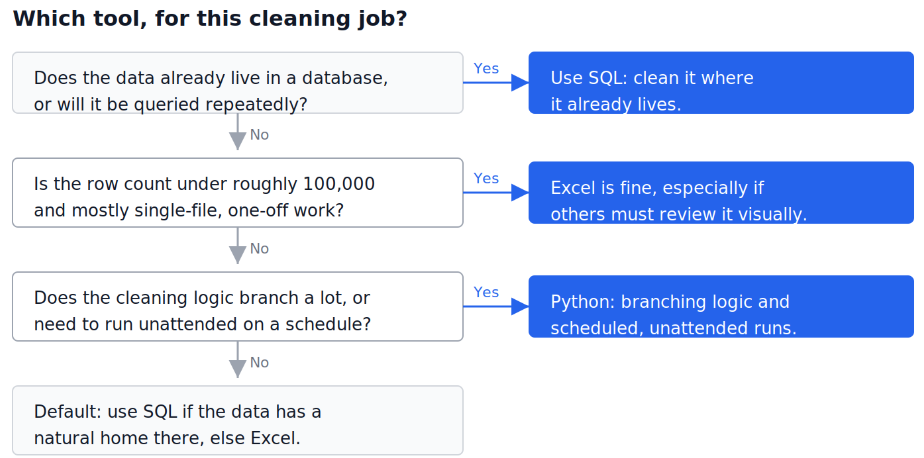
Almost every real disagreement about tool choice collapses once you answer that question honestly.
If the data already lives in a database and you will touch it more than once, clean it there with SQL. Moving it out to fix it and then having to reload it is wasted motion, and the fix stays with the data rather than living in a file on someone's laptop.
If the data arrives as a file, is small, and the job is genuinely one-off, Excel is often the fastest and most defensible choice, especially if someone non-technical needs to review the result by eye before it goes anywhere.
If the logic has real branching, needs to pull from more than one source, or has to run unattended on a schedule, Python is worth the extra setup cost.
Excel's real advantage is not formulas, it is that you are looking directly at the thing you are changing. Fixing the inconsistent store names at Larkspur, "Riverside," "riverside," "Riverside Store," "RIVERSIDE," means eyeballing a column, and a human glancing down a filtered list catches a typo pattern that a rule written blind would miss. Find and Replace, Flash Fill, and Text to Columns exist because a huge amount of real-world cleaning is exactly this kind of visual pattern-matching.
The cost is that Excel does not scale and does not remember what you did. A worksheet holds a maximum of 1,048,576 rows and 16,384 columns in the modern .xlsx format, and Microsoft's own specifications page confirms those limits are fixed regardless of your machine's memory. Larkspur's monthly export sits around 340,000 rows, comfortably under that ceiling today, but a chain that keeps opening stores will eventually outgrow it, and the ceiling arrives with no warning beyond a blunt error message.
The deeper problem is that clicks leave no record. If you delete a row, apply a filter, or type over a formula, there is no log of what changed or why, unless you built one yourself. This is not a hypothetical risk. Research presented at the European Spreadsheet Risks Interest Group has repeatedly cited Panko's finding that errors in spreadsheets are pandemic, a conclusion drawn from decades of field audits and controlled experiments across the industry. A spreadsheet that looks clean and a spreadsheet that is clean are not reliably the same thing, and nothing in the tool itself tells you which one you are looking at.
If Larkspur's transactions already sit in a database, which they do once the point-of-sale system has synced overnight, SQL cleans them without ever moving the data anywhere. A single query can standardise store names, split the timestamp, and flag unmatched refunds in one pass, and that query is a permanent, re-runnable artifact rather than a sequence of clicks nobody can reconstruct.
sql
UPDATE transactions
SET store_name = TRIM(INITCAP(store_name))
WHERE store_name <> TRIM(INITCAP(store_name));
SQL's real strength is that it is set-based: you describe the end state you want and the engine works out how to get there across the whole table at once, rather than looping row by row. It also enforces rules the moment data arrives rather than after the fact. A CHECK constraint requiring a positive transaction amount, or a NOT NULL constraint on store_id, stops bad data from being written in the first place. PostgreSQL's own documentation on constraints covers the full family, and understanding them changes how you think about cleaning: the strongest version of a cleaning rule is one the database refuses to violate, not one you apply after the mess already exists.
The limitation is that SQL is not built for anything conditionally messy in an open-ended way. Distinguishing a genuine refund from a same-day exchange that happens to look like one, based on a fuzzy combination of amount, timing, and item description, is the kind of judgment call that turns into an unreadable nested CASE expression fast. SQL wants rules; it is a poor fit for heuristics.
Python earns its place when the cleaning logic genuinely branches, when data has to be combined from more than one source that does not share a database, or when the whole thing needs to run on a schedule without anyone present. Larkspur's refund-matching problem, join same-day transactions on customer and near-equal amount, then apply a cascading set of fallback rules when the first match fails, is naturally expressed as a function with real conditional logic in a way that is painful in either of the other two tools.
python
import pandas as pd

df["store_name"] = df["store_name"].str.strip().str.title()
df[["date", "time"]] = df["timestamp"].str.split(" ", expand=True)
Working with a pandas DataFrame is fast because it holds the whole thing in memory, but that is also its ceiling. pandas' own documentation is direct about this: pandas provides data structures for in-memory analytics, and even datasets that are a sizable fraction of available memory become unwieldy, since many operations need to make intermediate copies. For Larkspur's 340,000-row monthly file this is a non-issue. For a retailer ten times the size trying to load a year of transactions at once, it becomes the whole problem, and at that point the honest answer is usually to push the heavy lifting back into SQL rather than fighting pandas' memory ceiling.
Python's other real advantage, underrated relative to its computational power, is that a script is trivially version-controlled. Every change to the cleaning logic can be tracked, reviewed, and rolled back the same way code changes anywhere else are, which is a level of auditability neither Excel nor an ad hoc SQL session naturally gives you.
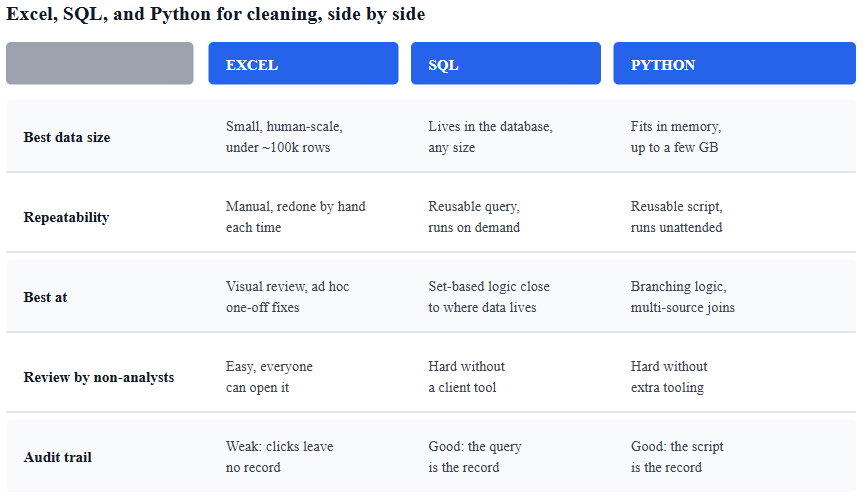
Take one concrete problem from the Larkspur file: sale_timestamp arrives as a single text field like 2026-03-14 18:32:07, and finance needs date and time as separate columns.
In Excel, this is Data, Text to Columns, splitting on the space character, or a Flash Fill demonstration on the first two rows followed by auto-complete. Thirty seconds, entirely visual, and gone the moment you close the file without saving the steps anywhere.
In SQL, it is a generated expression, permanent and re-runnable against every future load without anyone repeating a single click:
sql
SELECT
  sale_timestamp::date AS sale_date,
  sale_timestamp::time AS sale_time
FROM transactions;
In Python, it is one line, and it sits inside a script that can also handle the store name cleanup, the refund matching, and the test-transaction filter in the same run, then write a log of exactly what changed:
python
df["sale_date"] = pd.to_datetime(df["sale_timestamp"]).dt.date
df["sale_time"] = pd.to_datetime(df["sale_timestamp"]).dt.time
Three correct answers to the same problem. The one worth doing is the one that matches how many times this needs to happen and who has to trust the result afterward.
The most common mistake is not picking the weakest tool, it is picking the strongest one out of habit regardless of fit. Writing a full Python script to split one column in a 200-row file that will never be touched again is not rigor, it is overhead. The reverse mistake is just as common and more expensive: continuing to hand-clean a 300,000-row monthly export in Excel because that is how it has always been done, when the exact same logic in SQL would run in seconds and leave a permanent record behind.
A second mistake is treating the tool choice as permanent. Larkspur's transaction volume will not stay at 340,000 rows a month forever, and the right answer for a ten-store chain is not the right answer for a hundred-store one. Revisiting the decision as the data grows is not indecision, it is the same judgment applied to new facts.
Cleaning in Excel data that will be cleaned again next month. If the same fix repeats, the manual version is the expensive one over any reasonable time horizon, even though it feels faster the first time.
Writing SQL for genuinely fuzzy, judgment-heavy logic. A twelve-level nested CASE expression trying to distinguish refunds from exchanges is a sign the logic belongs in Python, not a sign you need a cleverer query.
Loading more into pandas than memory comfortably holds. The failure mode is a silent slowdown or a crash partway through, not a clear warning beforehand.
Cleaning data with clicks and no log of what changed. If someone asks a week later why a number moved, "I don't remember exactly what I did" should never be the honest answer.
Assuming the "senior" tool is always the right one. A two-minute Excel fix that never needs to be repeated is not a worse solution than a Python script for the same one-off job, it is the appropriately-sized one.
Ignoring where the data already lives. Exporting from a database to clean in Excel or Python, then never loading the fix back, means the source system stays wrong forever and the same problem resurfaces next month.
Each tool has a natural next step once the basic decision is made. If Excel is the right call for the job in front of you, 25 Excel formulas every data analyst uses and cleaning messy data in Excel cover the specific functions and techniques that make manual cleaning fast rather than tedious.
If the data has a natural home in a database, your first 10 SQL queries and 15 real-world business SQL problems build the fluency that makes writing a cleaning query as fast as opening a spreadsheet.
And once the logic genuinely needs Python's branching and repeatability, pandas basics: DataFrames, series, indexing and filtering is the right starting point, covering the operations that most cleaning scripts are actually built from underneath all the surrounding logic.
Quiz
Question 1 of 15
FAQ
FREE COURSES
A hands-on path from Python fundamentals to production-grade automation, built for data analysts. Learn to clean messy files, pull data from databases and APIs, generate automated Excel/PDF/PowerPoint reports, and schedule it all to run unattended - then go further with logging, secrets management, and workflow orchestration. Built around one consistent scenario: automating a retail company's weekly sales reporting. Closes with two full portfolio projects using real data and complete worked solutions. No prior programming experience required.
Build practical, analyst-level Excel skills from foundations to advanced analysis. Learn how to clean and structure data, write powerful formulas, use lookups and dynamic arrays, build PivotTables and interactive dashboards, transform data with Power Query, create data models with Power Pivot and DAX, automate workflows with VBA, and perform statistical and financial analysis. The course uses realistic business scenarios and hands-on projects to help you turn Excel into a powerful tool for analysis, reporting, forecasting, and decision-making.
Learn to create clear, professional data visualizations in Python using Pandas, Matplotlib, Seaborn, Plotly, Streamlit, and Dash with practical projects and real-world business scenarios.