Your First 10 SQL Queries: SELECT, WHERE, ORDER BY and LIMIT
Ten queries against one 200-row orders table, building from SELECT to a query combining everything
6 Minutes Read
Data Analytics Program — Data Analytics — Next cohort Starts Oct 24 · 35% Discount
Enroll NowTen queries against one 200-row orders table, building from SELECT to a query combining everything
Every query in this guide runs against the same table: a 200-row orders table from a small online retailer. That's deliberate. Jumping between a different toy table for every example is how a lot of SQL tutorials make ten simple ideas feel like ten unrelated ones. Here, the table stays constant and only the query changes, which is a much closer match to how you'll actually work: the same schema, asked a lot of different questions.
# | Query pattern | What it helps you do |
|---|---|---|
1 |
| Inspect a table |
2 | Select specific columns | Return only the columns you need |
3 |
| Control how many rows you inspect |
4 |
| Filter categorical values |
5 |
| Filter numeric values |
6 |
| Require multiple conditions |
7 |
| Match alternative conditions |
8 |
| Sort from low to high |
9 |
| Sort from high to low |
10 | Combine the clauses | Answer a simple business question |
These aren't ten unrelated SQL tricks. They're ten query patterns built from four core clauses: SELECT, WHERE, ORDER BY, and LIMIT.
The table, orders:
order_id | customer_name | product | category | quantity | price | order_date | region |
|---|---|---|---|---|---|---|---|
1 | Ananya Rao | Wireless Mouse | Electronics | 2 | 799 | 2026-01-03 | South |
2 | Vikram Shah | Yoga Mat | Fitness | 1 | 1299 | 2026-01-04 | West |
3 | Priya Nair | Bluetooth Speaker | Electronics | 1 | 2499 | 2026-01-05 | South |
4 | Rohan Mehta | Running Shoes | Fitness | 1 | 3499 | 2026-01-05 | North |
5 | Sana Iyer | Desk Lamp | Home | 3 | 599 | 2026-01-06 | West |
The real table has 200 rows across these same eight columns, more products, more customers, more regions. These five are enough to check your own results against as you go.
sql
SELECT * FROM orders;* means "every column." This returns all 200 rows, every column, unfiltered and unsorted. It's the query you run first on any new table, purely to see what you're working with, and it's rarely the query you actually want as a final answer.
sql
SELECT customer_name, product, price FROM orders;Naming specific columns instead of * is worth doing as a habit even when you're just exploring, since it forces you to think about which columns actually matter to the question you're asking, and it's what you'll do in almost every real query from here on.
sql
SELECT customer_name, product, price FROM orders LIMIT 5;LIMIT 5 caps the result at five rows. On a 200-row table this doesn't matter much, but on a real table with millions of rows, SELECT * with no limit can be slow or genuinely expensive to run. Getting into the habit of limiting a first exploratory query is worth carrying forward. PostgreSQL's documentation on LIMIT and OFFSET covers the syntax in more depth, including why pairing LIMIT with ORDER BY matters for getting a consistent result.
sql
SELECT * FROM orders WHERE category = 'Electronics';WHERE filters rows before they're returned, keeping only the ones where the condition is true. Text values in the condition need single quotes around them, 'Electronics', not double quotes, which is a small syntax detail that trips up a lot of beginners moving from other languages.
sql
SELECT * FROM orders WHERE price > 2000;Numeric comparisons don't need quotes. >, <, >=, <=, and = all work the way you'd expect from basic arithmetic. This query returns every order over ₹2,000, regardless of category or customer.
sql
SELECT * FROM orders WHERE category = 'Electronics' AND price > 2000;AND requires both conditions to be true for a row to be included. This narrows the previous two queries down to their overlap: electronics orders specifically over ₹2,000, not all electronics and not all orders over ₹2,000 separately.
sql
SELECT * FROM orders WHERE category = 'Electronics' OR category = 'Fitness';OR requires at least one condition to be true. This is a common point of confusion for beginners: AND narrows a result down, OR usually widens it. A query asking for category = 'Electronics' AND category = 'Fitness' would return nothing at all, since no single row can belong to two categories at once, which is a genuinely useful mistake to make once so it sticks.
sql
SELECT customer_name, product, price FROM orders ORDER BY price ASC;ORDER BY sorts the result set. ASC, ascending, is actually the default, so you'll often see this written without it, but including it explicitly while you're still learning is a reasonable habit until the direction is second nature.
sql
SELECT customer_name, product, price FROM orders ORDER BY price DESC;DESC reverses the sort order. This single-word change is how most "top N" business questions get answered, biggest orders, most recent signups, highest churn, and it's worth knowing cold rather than looking up every time.
sql
SELECT customer_name, product, price
FROM orders
WHERE category = 'Electronics'
ORDER BY price DESC
LIMIT 5;
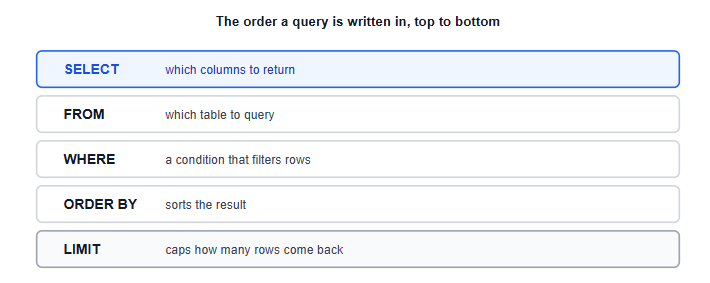
This is the query that actually looks like real work: the five highest-value electronics orders in the table. Notice the order the clauses are written in, SELECT, FROM, WHERE, ORDER BY, LIMIT, which is fixed. SQL won't run if you write ORDER BY before WHERE, even though logically you might think about sorting before filtering. PostgreSQL's SELECT documentation lays out the full clause order for anyone who wants the complete syntax reference. Writing clauses in this order is worth memorising early, since it's the shape every more advanced query in this series will build on.
Using double quotes for text values. WHERE category = "Electronics" fails or behaves unexpectedly in many SQL dialects; single quotes are the safe default for text.
Writing clauses out of order. SELECT, FROM, WHERE, ORDER BY, LIMIT is the fixed order. A query with ORDER BY before WHERE won't run.
Confusing AND and OR. AND narrows a result to rows meeting every condition; OR widens it to rows meeting any one of them. Asking for two mutually exclusive values joined by AND is a common way to accidentally get zero rows back.
Forgetting that SELECT * doesn't scale. It's fine for exploring a small table; on a large one, naming only the columns you need and adding a LIMIT while exploring is the safer default.
Assuming ORDER BY changes the underlying table. It only changes how this particular result is displayed; the table itself is untouched.
This guide covers the four clauses every other SQL topic in this series builds on top of. The natural next step is SQL CASE statements, which builds business logic directly into a query on this same orders table, followed by GROUP BY and aggregate functions, which turn a filtered, sorted list of rows like the ones above into an actual summary number; that broader ground is covered in the SQL for Data Analysts guide.
If any of this felt like it assumed more background than you have, for example why a query sometimes hits a live system and sometimes hits a separate copy of the data, Databases, Data Warehouses and Data Types covers that layer, and it's worth reading either before or after this guide. Once you're comfortable writing queries like these, Power BI data modeling picks up the same table concepts and applies them to building a report.
If you'd rather practise these ten queries against a dataset of your own choosing before moving on, a few of the beginner project ideas are a good fit for exactly that kind of practice. And if you're mapping this against the wider learning sequence, the Data Analyst roadmap shows where SQL fundamentals like this fit alongside everything else.
Quiz
Question 1 of 15
FAQ
FREE COURSES
An 11-module SQL course for data analysts preparing for interviews, built around one consistent company (Kestrel Outfitters) and one repeated method: the Five Questions What is the grain? What rows do I need? How should I combine them? How should I calculate the answer? How do I validate it? Starts with how to approach an unfamiliar SQL problem, then builds through core retrieval, aggregation, joins, subqueries and CTEs, window functions, NULL and conditional logic, reshaping and combining data, working with time, and data quality and validation finishing with a dedicated module on performance for analysts. Every lesson includes a custom diagram and a set of interview questions tagged by difficulty (Screener, Analyst, Advanced, Case) and type (Conceptual, Query Writing, Debugging, Optimization, Business Case), each with a fully worked solution. PostgreSQL-first, with dialect callouts for MySQL, SQL Server, BigQuery, and Snowflake throughout.
Picks up exactly where a SQL basics course ends and covers subqueries, common table expressions, and window functions in depth, including the specific bugs that silently produce wrong answers in production, like the NOT IN and NULL trap. Built on a real five-table relational database with genuine foreign key relationships, delivered as both SQLite and CSVs. Covers scalar and correlated subqueries, recursive CTEs, ranking and offset window functions, frame clauses, and a practical decision guide for choosing the right tool. Closes with two portfolio projects producing polished, presentation-ready analytical queries.

This course takes you from MySQL fundamentals to job-ready SQL and database skills through 14 structured modules. Learn database design, querying, joins, aggregation, constraints, indexing, CTEs, views, stored procedures, triggers, and transactions with practical examples and exercises. Build four complete portfolio projects covering e-commerce, library management, blogging, and sales analytics. Finish with interview preparation, career guidance, project ideas, and current compensation insights.