ChatGPT vs Claude vs Gemini for Data Analysis
All three can now run real code against your data. The differences that actually matter are about fit, not which one is "smartest."
5 Minutes Read
Data Analytics Program — Data Analytics — Next cohort Starts Oct 24 · 35% Discount
Enroll NowAll three can now run real code against your data. The differences that actually matter are about fit, not which one is "smartest."
A disclosure before anything else: this article is published by Gradient Learnings and written using Claude, one of the three tools being compared here. That is a real conflict of interest, not a minor formality, and the honest way to handle it is to say so plainly rather than pretend a fair three-way review of a tool by that same tool is straightforward. Where this article makes a specific claim about Claude, treat it with the same scrutiny you would apply to any vendor describing its own product, and verify current specifics directly on each company's own site before deciding anything based on this alone.
With that said, the underlying question is a genuinely useful one. All three tools can now do more than describe what code would theoretically do, they can actually run it against a file you upload, which is a meaningfully different capability than a well-written explanation. The differences that matter for real data work are less about which model is generally smartest and more about how each tool handles your actual files, your actual workflow, and your actual need to check the answer afterward.
Rohan, an operations analyst at a logistics company in Kolkata, needs to decide which of these three tools to build into a recurring weekly reporting task. His situation, and the specific test he ran to decide, comes later in this article. It is not a universal answer, since his workflow is not yours, but the method he used is worth borrowing regardless of which tool you end up choosing.
Before comparing anything, it helps to define the bar precisely, since "AI for data analysis" gets used loosely enough to mean almost anything.
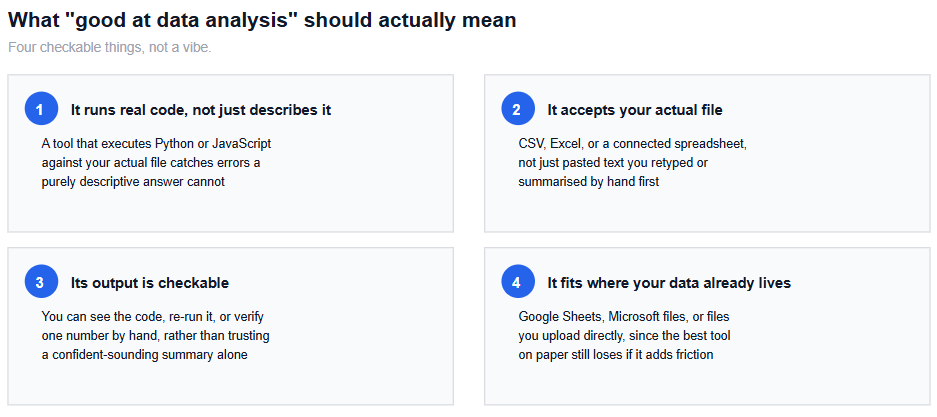
It runs real code, not just describes it. A tool that actually executes Python or JavaScript against your file can catch errors, edge cases, and calculation mistakes that a purely descriptive answer will confidently gloss over.
It accepts your actual file. A CSV, an Excel workbook, or a connected spreadsheet, not a version you had to retype or summarise by hand first.
Its output is checkable. You can see the code that ran, re-run it yourself, or verify at least one number against the source, rather than trusting a confident summary at face value.
It fits where your data already lives. A technically capable tool still adds friction to your actual workflow if using it means exporting files somewhere else first.
All three vendors have converged on the same basic idea, letting the model write and execute code against uploaded or connected data, but they have built it into different surrounding ecosystems, which is where the practical differences actually live.
What to check | ChatGPT | Claude | Gemini |
|---|---|---|---|
Real code execution | Yes, OpenAI describes its data analysis feature as writing and running Python on the user's behalf | Yes, Anthropic offers a code execution and file analysis capability within Claude.ai | Yes, Google's Gemini models support a code execution capability, generating and running code iteratively |
File upload | CSV, Excel, and other common formats supported directly | CSV, Excel, and other common formats supported directly | CSV, Excel, and other common formats supported directly |
Native ecosystem integration | Direct file import from Google Drive and Microsoft OneDrive, according to OpenAI's own announcement | Connects to external services such as Google Drive through its connector system | Deepest native integration inside Google Sheets itself, including generating dashboards and charts directly in the sheet |
Where it fits best by default | Teams already working across both Google and Microsoft file ecosystems | Teams that want the analysis and the conversation to happen in the same place, with generated files and interactive outputs | Teams whose data already lives natively in Google Sheets and Workspace |
What to verify yourself | Current file size limits and which plan tier includes full data analysis features | Current file size limits, which plan tier includes code execution, and data retention terms for your account type | Whether the specific feature (Sheets integration versus the standalone Gemini app) matches the workflow you actually use |
None of these rows are a ranking. They describe genuinely different shapes of the same underlying capability, and the right fit depends entirely on where your data already lives and how your team already works, not on which vendor currently has the flashiest release notes.
ChatGPT's strength is cross-ecosystem file handling. According to OpenAI's own description of the feature, uploaded data is analysed by writing and running Python code, and files can be added directly from either Google Drive or Microsoft OneDrive without a manual download-and-reupload step. That makes it a reasonable default for a team that works across both Google and Microsoft file formats day to day, rather than living entirely inside one ecosystem.
Gemini's strength is depth inside Google Sheets specifically. Reporting on Google's recent Workspace updates describes Gemini in Sheets handling complex, multi-step requests by converting them into code that is generated and run automatically, going beyond simple formula suggestions into building charts, dashboards, and full analyses inside the sheet itself. Google has also made its own claims about strong performance on public spreadsheet benchmarks, which is worth noting as the vendor's own claim rather than independently verified fact, the same way any self-reported statistic deserves a second look before you rely on it.
Claude's approach centres on doing the analysis and the conversation in one place. Its code execution and file analysis capability runs in a sandboxed environment within Claude.ai, and can produce interactive outputs alongside the underlying code, rather than requiring a separate spreadsheet application to view the result. As with the other two, exact file size limits, which plan tiers include which features, and current data-handling terms are worth checking directly rather than assuming they match what is written here, since these details change.
A useful piece of context on how this space evolved: a 2024 report on Claude's code execution launch noted that Google's Gemini already offered a comparable feature called Code Execution, and OpenAI's models offered a similar capability under the name Advanced Data Analysis. All three companies have been building toward the same basic capability for a while, which is part of why the meaningful differences now sit in ecosystem fit rather than in whether the feature exists at all.
Trusting a confident-sounding summary without checking whether code actually ran. A tool describing what it would do and a tool that actually executed code against your file can produce answers that read identically but are not equally trustworthy.
Uploading sensitive or regulated data before checking the vendor's data-handling terms. Retention and training-use policies differ by account tier and change over time, and this is worth confirming directly rather than assuming.
Assuming the free tier behaves like the paid tier. Code execution, file size limits, and integration features are often gated by plan, and a comparison based on a free account can be misleading for a team evaluating a paid rollout.
Picking a tool based on general reputation rather than your specific workflow. A tool that is excellent at coding tasks generally is not automatically the best fit for a recurring spreadsheet reporting job if it does not connect to where that spreadsheet already lives.
Never verifying a single number by hand. The fastest way to build real confidence in any of these tools, or to catch a real mistake, is checking one output against the source data yourself.
Treating a single comparison article, including this one, as the final word. These products change on a roughly monthly cycle. What is accurate today may not be in six months, which is exactly why direct testing matters more than any fixed ranking.
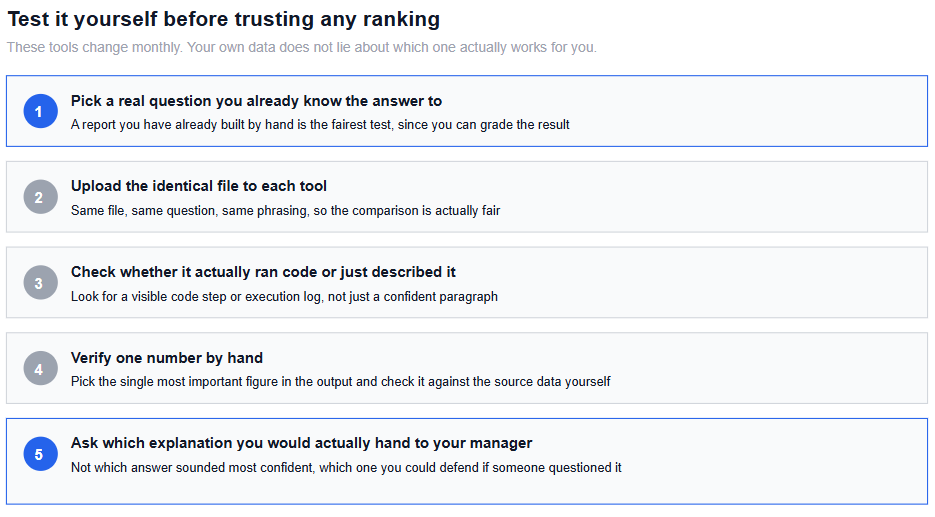
Rohan's team compiles a weekly regional sales summary from a CSV export, a task he already does by hand, which made it a fair test since he could grade the results against something he had verified himself.
He gave the identical file and the identical request, summarise sales by region and flag any region more than 15 percent below its four-week average, to each of the three tools in turn. He checked three things each time: whether the tool showed actual executed code or just a written explanation, whether the flagged regions matched what he already knew from doing this manually, and how much follow-up prompting it took to get a result he would actually send to his manager without editing it first.
None of the three failed outright. The differences he found were about fit rather than raw capability: one tool handled the file faster because it connected directly to where his team already stored it, without a manual upload step, while another required more back-and-forth to get the output formatted the way his team expected. He picked the one that matched his actual weekly workflow with the least friction, not the one that seemed most impressive on a single test. He also kept checking the flagged regions by hand for a few more weeks before fully trusting the automated version, since one successful test is not the same as an established track record.
If you are earlier in the process of figuring out where AI fits into analyst work generally, how AI is changing the data analyst role covers that broader question before narrowing down to a specific tool.
For a wider view beyond these three specifically, AI tools for data analysts in 2026 covers additional tools built more narrowly around analytics workflows rather than general-purpose chat.
And if your actual use case is exploring a dataset you do not understand yet rather than automating a report you already know how to build, how to use AI to explore an unknown dataset is a closer match to that specific problem.
Quiz
Question 1 of 15
FAQ
FREE COURSES

This hands-on Pandas course takes you from your first DataFrame to writing efficient, production-ready data analysis pipelines. Learn data cleaning, transformation, aggregation, merging, time series, reshaping, and performance optimization using one realistic e-commerce dataset. Build five complete portfolio projects covering sales, customer cohorts, inventory, revenue trends, and survey analysis. By the end, you'll confidently handle and analyze real-world data for data analyst and data science roles.
EDA sits between cleaned data and formal statistical testing, and this course treats it as its own real skill rather than a warm-up step. Five modules cover the EDA mindset, fast univariate and bivariate scanning, multivariate and time-based exploration, anomaly spotting, and turning an exploration session into a prioritized findings summary. Built on a full year of realistic daily business data, including genuine seasonality and two deliberately planted data quality anomalies that a later lesson finds and resolves. Closes with a cold first-look investigation on an unfamiliar dataset and a full performance deep-dive project.

This project-driven course takes you from zero Python experience to job-ready data analyst skills. Learn Python, NumPy, pandas, visualization, EDA, statistics, databases, automation, and practical machine learning through a real-world business scenario. Build five end-to-end portfolio projects across retail, churn, marketing, finance, and HR analytics. Finish with career guidance, role expectations, and current compensation insights to prepare for the job market.