AI Tools for Data Analysts in 2026: What's Actually Worth Using
Evaluated against specific analyst tasks, with an honest verdict for each, including which ones aren't worth your time yet
6 Minutes Read
Evaluated against specific analyst tasks, with an honest verdict for each, including which ones aren't worth your time yet
Most "best AI tools" lists are ranked by how many tools the author could fit in, not by whether each one actually earns a place in your workflow. That's not especially useful when you're trying to decide what to actually spend time learning. The more useful question isn't "what tools exist," it's "for this specific task I do every week, is there a tool worth adopting, and is it worth adopting right now, given what I already have access to."
This guide answers that question tool by tool, organised by the job each one does rather than by brand name, with an honest verdict for each: worth adopting, situational, or not worth it yet. A companion piece on how AI is actually changing the analyst role, linked at the end, covers the underlying reasoning for why verification matters so much here; this guide is the practical follow-up, tool by tool.
Three tiers, used consistently throughout:
Worth it. Genuinely saves time on a real task, with a reasonable learning curve and no major downside to adopting it now.
Situational. Useful, but only if a specific condition is true, you're already on the right platform, your team already pays for it, your data is clean enough for it to work well. Not a blanket recommendation either way.
Not worth it yet. Interesting in principle, but either too unreliable for the way it's currently built, or a worse use of your time than the fundamentals it's trying to shortcut.
Category | Example tools | Verdict | Why |
|---|---|---|---|
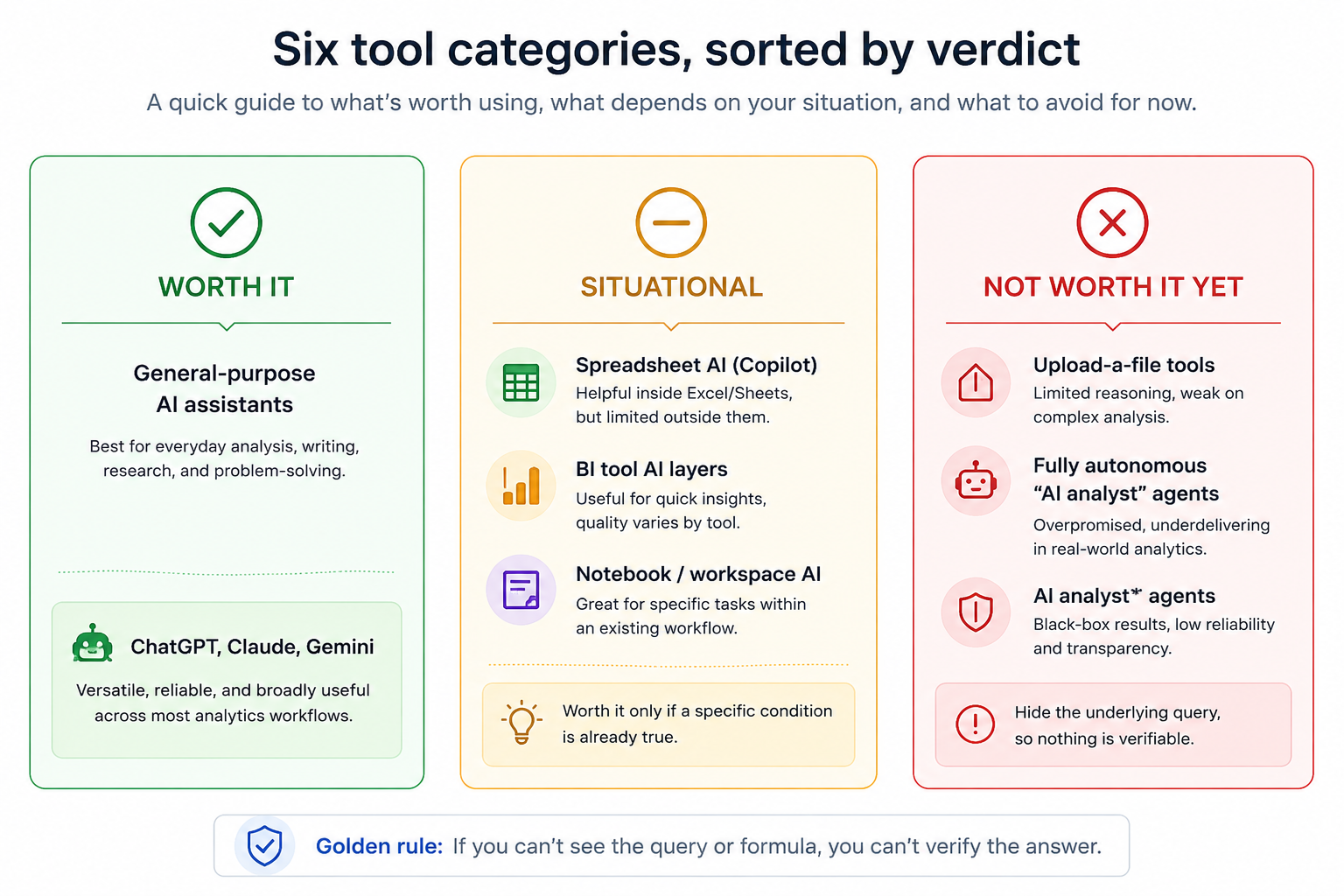
General-purpose AI chat assistants | ChatGPT, Claude, Gemini | Worth it | Genuinely useful for drafting formulas, SQL, and code, and for explaining concepts, on data you paste in or describe |
Spreadsheet AI (in-app) | Microsoft 365 Copilot in Excel | Situational | Strong if your organisation already licenses it; not worth buying separately just for this |
BI tool AI layers | Power BI Copilot, Tableau AI | Situational | Only as good as the data model underneath; a messy model produces a confidently wrong summary just as easily as a clean one produces a good one |
Notebook and workspace AI tools | Hex, Deepnote | Situational | Strong for teams already doing collaborative SQL and Python work; unnecessary overhead for a solo beginner |
Upload-a-file conversational analysis tools | Julius AI and similar "ask your CSV a question" tools | Not worth it yet, for learning | Fast for a one-off answer, but it builds no transferable skill and often hides the underlying query |
Fully autonomous "AI analyst" agents | Tools that skip showing the SQL or code entirely | Not worth it yet | The verification step this guide keeps returning to becomes impossible if you can't see what actually ran |
ChatGPT, Claude, and Gemini are among the most broadly useful general-purpose AI assistants for analyst work, and for good reason: they're flexible enough to help with almost every stage of the job, drafting a first-pass SQL query, explaining what a DAX formula does, writing an Excel formula from a plain-language description, summarising what a messy dataset looks like once you've pasted in a sample. OpenAI documents ChatGPT's ability to inspect uploaded data, build tables and charts, and run code-backed analysis. Anthropic documents Claude's equivalent capability to analyse uploaded spreadsheets and files and produce formatted output. Google documents Gemini's data analysis and formula generation inside Google Sheets specifically.
The honest limitation is that these tools work on the data you give them, not the data sitting in your company's actual warehouse. Pasting in a CSV sample or describing your schema is a real workflow, but it's a manual step, and it means the tool has no way to check its own answer against your real numbers. For genuinely large datasets or anything that needs a live connection to your company's systems, this category is a drafting and thinking partner, not a direct pipeline to your data.
Verdict: worth it, specifically for drafting, explaining, and thinking through a problem, not for treating the output as a finished answer without checking it against your actual data.
Microsoft 365 Copilot in Excel can generate formulas, build a first-pass Pivot Table, and summarise a dataset from a plain-language request. Where this genuinely helps is exactly where you'd expect: turning "I need total revenue by region, filtered to this quarter" into a working SUMIFS or Pivot Table faster than building it by hand, especially useful while you're still building fluency with the syntax yourself.
The situational part is real, though. This sits behind a Microsoft 365 subscription tier most individual learners won't have access to, and if your organisation doesn't already license it, it's not worth paying for separately just to speed up formula writing that a general-purpose AI assistant, or the Excel formulas you already know, can handle for free.
Verdict: situational. Genuinely useful if your employer already provides it. Not worth seeking out on your own budget purely for this.
Power BI Copilot and Tableau Agent in Pulse (narrated summaries, natural-language querying, automated insight surfacing) can generate a dashboard, a DAX measure, or a written summary of a report from a plain-language prompt. This is a real time-saver for a well-modelled dataset.
That last qualifier is the entire story, though. These tools generate their output based on the data model you've already built, they don't fix a bad one. A model with the wrong relationship cardinality, or a "Category" column with three different spellings of the same value, will produce a confidently wrong AI-generated summary exactly as easily as it produces a confidently wrong chart built by hand. The AI layer speeds up production once your modelling is solid; it does nothing to compensate for modelling that isn't.
Verdict: situational. Worth using once your data model is genuinely solid and your organisation already has the tool. Not a substitute for learning to model data correctly in the first place, and not worth adopting before that skill is in place.
Tools like Hex and Deepnote combine a collaborative, notebook-style workspace with AI assistance for writing SQL and Python; they're designed for collaborative analytics workflows involving SQL, Python, notebooks, and shared work, multiple analysts building on the same queries and dashboards over time.
For a beginner working through practice problems alone, this category adds real overhead without a matching benefit: the collaboration features that justify the tool don't do much for a single learner, and the AI assistance inside them isn't meaningfully different from asking a general-purpose assistant the same question. This is a category worth knowing exists, and worth picking up once you're on a team that already uses one, rather than something to seek out early.
Verdict: situational, specifically for team-based collaborative work. Not the right starting point for someone still building core SQL and Python fluency solo.
Tools built around "upload your spreadsheet or CSV and ask it questions in plain English" genuinely do what they promise: they're fast for getting a one-off answer out of a file without writing any formula or query yourself.
That speed is exactly the problem if your goal is building analyst skill rather than getting a single answer. These tools work by hiding the underlying query or formula from you, which means you learn nothing transferable from using them, and you have no way to check whether the answer is actually right without redoing the work in a tool that shows its steps. For a one-off personal task with low stakes, that trade-off might be fine. For anything you're being paid to get right, or anything you're trying to learn from, it isn't.
Verdict: not worth it yet, specifically for anyone still building core skills. The convenience is real; it's just convenience that trades away the thing you're actually trying to develop.
A newer category of tool promises to skip the technical layer entirely: ask a business question in plain English, and the tool queries your warehouse, builds a chart, and narrates an answer, without ever showing you the SQL or code that ran. It's the most ambitious version of "AI replaces the mechanical work," and it's also the version that should worry you most as a working analyst.
The reasoning here connects directly to the validation problem covered in more depth in the companion piece on how AI is changing analyst work, linked below: a query that runs successfully and returns a plausible-looking number can still be quietly wrong, excluding the wrong rows, misdefining a metric, joining on the wrong key. Catching that kind of error requires being able to see and check the underlying logic. A tool that never shows you that logic at all makes independent verification much harder, because you can't inspect the query or code that produced the result.
Verdict: not worth it yet, for anything feeding a real business decision. If you try one of these tools, treat its answer as a hypothesis to verify in a tool that shows its work, not as a finished result.
Chasing every new tool instead of using what you already have access to. The biggest wins usually come from getting genuinely fluent with one general-purpose assistant, not from trying five niche tools shallowly.
Paying for a tool your employer will license anyway. Check what's already available at work before spending your own money, especially for the BI-tool-specific AI layers.
Treating a hidden-query tool's answer as final. If you can't see the SQL, the formula, or the code that produced a number, that number is a draft, not a finding.
Adopting a BI AI layer before the underlying model is solid. The AI speeds up a good model; it does nothing to fix a bad one, and can make a bad one look more convincing.
Skipping the fundamentals because a tool can draft the syntax. Every tool in this guide is more useful in the hands of someone who can already read and evaluate its output, not less.
This guide covers tool selection; the deeper reasoning for why verification matters so much across all of them is in how AI is changing the data analyst role. If SQL fundamentals are the area you'd want to shore up before leaning harder on any of these tools, the SQL for Data Analysts guide is the place to start; the Excel formulas and Power BI guides referenced earlier cover the same ground for those tools, and Power BI vs Tableau vs Excel is worth reading if you haven't settled on which BI tool to prioritise yet. Every tool covered here is more useful in the hands of someone who already has that foundation.
A good way to practise the verification habit this guide keeps returning to is trying one of these tools against a project you already understand well; several of the beginner project ideas work well for exactly that. And if you're weighing where AI tool fluency fits against everything else worth learning, the Data Analyst roadmap shows the broader sequence.
Quiz
Question 1 of 15
FAQ