20 AI Prompts for SQL Analysis
The prompts that actually get you a correct query on the first try, organized by what you're trying to do
5 Minutes Read
Data Analytics Program — Data Analytics — Next cohort Starts Oct 24 · 35% Discount
Enroll NowThe prompts that actually get you a correct query on the first try, organized by what you're trying to do
Most people typing SQL questions into an AI chat window write something like "write me a query to get top customers." Then they get a query that references a customer_name column that doesn't exist in their database, joins on the wrong key, or quietly returns duplicate rows because nobody mentioned there could be more than one order per customer per day. The problem usually isn't the AI model. It's that the prompt didn't contain enough of the information a human analyst would have used without thinking about it.
This article is a working set of 20 prompts for SQL analysis, grouped by what you're actually trying to do: writing a query from scratch, fixing one that's broken, speeding one up, understanding SQL someone else wrote, and building your own SQL skills faster. Every example uses the same running scenario so you can see how the prompts build on each other, a food delivery company called PlateRoute with orders, restaurants, riders, and ratings tables.
Ask an AI assistant "get me the top restaurants by revenue" and you'll get a query back. Ask the same assistant with the table structure, the date range, the definition of "revenue" (gross order value or net after refunds), and whether cancelled orders count, and you'll get a query that's actually right the first time.
This isn't unique to SQL. GitHub's documentation on prompting Copilot Chat makes the same point about code generation generally: giving a broad description of the goal first and then listing specific requirements produces meaningfully better responses than a single vague ask. SQL is arguably more sensitive to this than general-purpose code, because a syntactically valid query can run without error and still return the wrong numbers. There's no compiler error for "joined on the wrong grain."
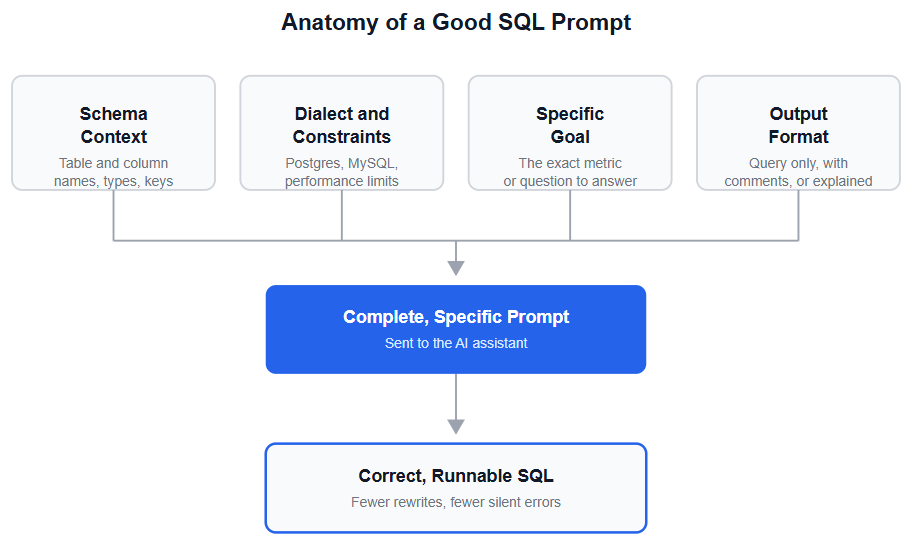
Four pieces of information turn a vague SQL request into a precise one:
Schema context. Table and column names, data types, and how tables relate. If you don't paste the actual CREATE TABLE statements or a column list, the AI is guessing at names, and it will guess wrong on anything non-obvious like a status enum or a soft-delete flag.
Dialect and constraints. PostgreSQL, MySQL, Snowflake, and BigQuery all diverge on date functions, string concatenation, and window function syntax. Say which one you're using.
A specific goal. Not "analyze sales" but "total order value by restaurant, for the last 30 days, excluding cancelled orders."
Output format. Do you want just the query, the query with inline comments explaining each step, or the query plus a plain-language walkthrough of the logic?
Anthropic's own prompt engineering documentation frames this the same way for any task, not just SQL: models respond best to instructions that are clear, direct, and detailed rather than left for the model to infer. The four-part structure above is just that principle applied specifically to database work.
1. The full-context first query. "Here are the CREATE TABLE statements for orders, restaurants, and riders in PostgreSQL. Write a query that returns total order value per restaurant for the last 30 days, excluding orders with status = 'cancelled'. Return only the SQL." Pasting the actual DDL instead of describing tables from memory removes the single biggest source of AI hallucinated column names.
2. The join clarifier. "Using the schema above, I need one row per order with the restaurant name and the rider's average rating attached. Tell me which join type you're using and why before you show the query." Asking the model to justify the join type (inner versus left) catches silent row-dropping before it reaches a dashboard.
3. The window function request. "Write a PostgreSQL query using a window function to rank restaurants by weekly revenue within each city, without collapsing the result into one row per city." Window functions are the single most common thing analysts ask AI for help with and get wrong on their own, since PostgreSQL's documentation notes they're only permitted in the SELECT list and ORDER BY clause, not in WHERE or GROUP BY, a rule most people learn by hitting the error. They're also the backbone of running totals and trailing comparisons well beyond ranking, one of several areas worth solidifying in a broader SQL skills guide for data analysts if the syntax still feels shaky.
4. The incremental build. "Start with a query that counts total orders per day for PlateRoute. Once that looks right, I'll ask you to add a rolling 7-day average on top of it." Building a query in layers, the way you'd build it by hand, catches mistakes at each step instead of debugging a 40-line query all at once.
5. The edge-case query. "Write a query to find riders who delivered zero orders in the last 14 days but are still marked active in the riders table. Handle the case where a rider has no rows at all in orders." Naming the edge case (no matching rows) up front is the difference between getting an INNER JOIN that silently excludes exactly the riders you're trying to find, and getting a correct LEFT JOIN. Edge cases like this one are the kind of thing worth a dedicated validation pass once the query itself runs, since a query that executes cleanly can still be quietly wrong.
6. The error-message prompt. "This query throws '[paste exact error text]'. Here's the query and the relevant table schema. What's wrong and what's the fix?" Pasting the literal error message, not a paraphrase of it, gives the model the specific line and token Postgres or MySQL flagged, instead of forcing it to guess at ten possible causes.
7. The wrong-numbers prompt. "This query runs without error but the total is double what I expect. Here's the query and a sample of three rows from each joined table. What could cause inflated totals?" This is the most valuable debugging prompt in the list, because duplicate rows from a one-to-many join are the most common cause of silently wrong SQL, and they never throw an error.
8. The logic-check prompt. "Before I run this, walk through what this WHERE clause actually filters for, one condition at a time." Asking for a plain-language walkthrough before execution catches misplaced parentheses around AND/OR logic, which change the meaning of a filter without changing whether it runs.
9. The NULL-handling prompt. "Does this query handle NULL values in the discount_amount column correctly, or will NULLs get silently excluded from the SUM?" NULL handling is a recurring blind spot in AI-generated SQL because a query with SUM(discount_amount) looks complete even when unmatched rows quietly vanish from an aggregate.
10. The plan-first prompt. "Here's my query and the output of EXPLAIN ANALYZE on it. What's the most expensive step in this plan, and what would fix it?" Pasting the actual execution plan rather than describing the query as "slow" gives the model something concrete to work from, since PostgreSQL's documentation on using EXPLAIN notes that a WHERE clause applied as a filter condition still has to visit every scanned row even when the row estimate looks small.
11. The index suggestion prompt. "Given this query and these table sizes (orders: 40 million rows, restaurants: 12,000 rows), what indexes would you add, and what's the tradeoff of adding them?" Asking for the tradeoff, not just the index, is what keeps you from over-indexing a write-heavy table.
12. The rewrite-for-performance prompt. "Rewrite this query to avoid the subquery in the WHERE clause, using a JOIN or CTE instead, and explain whether that actually changes the execution plan for PostgreSQL specifically." Dialect matters here: a rewrite that helps in one database engine can be a no-op or even slower in another.
13. The aggregation-order prompt. "Would filtering orders to the last 90 days before joining to restaurants be faster than filtering after the join? Explain using this schema." This forces the model to reason about filter pushdown instead of just producing two versions of the query.
14. The plain-language translator. "Explain what this query does in plain English, as if to someone who has never seen SQL, one clause at a time." Useful for inherited dashboards and queries pulled from a shared repo with no documentation.
15. The intent-check prompt. "Based on this query, what business question do you think the original author was trying to answer? Are there any parts that look inconsistent with that goal?" This catches queries that technically run but no longer match the metric name in the dashboard title, a common source of "why don't these two reports agree" tickets.
16. The cross-tool translation prompt. "Translate the logic in this SQL query into an equivalent pandas operation using groupby and merge." This is genuinely useful when moving analysis from a warehouse into a Python notebook, and it works because the underlying logic, split-apply-combine, maps directly onto how pandas groupby is designed to mirror SQL's GROUP BY and aggregate functions.
17. The concept-with-your-data prompt. "Explain CTEs using my orders and ratings tables specifically, not a generic example." Learning a concept against your actual schema sticks better than a textbook example with unfamiliar table names.
18. The alternative-approaches prompt. "Show me three different ways to answer 'which restaurants had a ratings drop this month,' using a subquery, a CTE, and a window function. Tell me when you'd pick each one." This is a fast way to build intuition for why SQL has multiple ways to solve the same problem.
19. The code-review prompt. "Review this query I wrote as if you were a senior analyst doing a pull request review. What would you flag?" Framing it as a review, not a rewrite request, tends to produce more specific, teachable feedback rather than a wholesale replacement.
20. The self-test prompt. "Give me a query with a deliberate bug in the join condition, based on my orders and riders schema, and let me try to spot it before you explain it." Debugging practice on a planted error, using your own schema, builds the pattern-recognition that makes real debugging faster later.
Pasting a vague table description instead of the real schema. Writing "I have an orders table with the usual columns" forces the model to guess at names like order_date versus created_at, and it will guess with total confidence.
Leaving out the SQL dialect. Date arithmetic, string functions, and even quoting rules differ between PostgreSQL, MySQL, and Snowflake. Without a dialect stated, you'll often get a syntactically clean query that fails on your specific database.
Accepting the first answer without checking row counts. A join that silently duplicates rows produces a query that runs cleanly and returns a plausible-looking, wrong number. Always sanity-check totals against a known figure before trusting the output.
Asking for "optimized" SQL without sharing the execution plan or table sizes. The model has no way to know whether a table has 500 rows or 500 million without being told, and the right optimization is completely different at each scale.
Treating AI-written SQL as a black box. Asking for an explanation alongside the query, even a short one, turns every generated query into a small lesson instead of a copy-paste dependency. Whether to trust the result without checking is a validation habit worth building deliberately, and it's covered in more depth in how AI is changing the data analyst role, which treats catching a wrong AI-generated query as its own distinct skill.
Not specifying what "correct" means for edge cases. Should cancelled orders count toward revenue? Should a customer with zero orders appear with a zero, or not appear at all? These decisions change the query's logic, and the model can't infer your business rules.
The prompts above work best once you're comfortable with the fundamentals they build on, particularly joins, window functions, and reading an execution plan. If any of those terms felt unfamiliar while reading, spend time with them directly before leaning on AI to generate the SQL for you. AI-generated queries are easiest to verify, and easiest to fix when something's off, when you already understand the SQL well enough to have written a rougher version yourself. Practicing the debugging and code-review prompts above on queries you already understand is a fast way to build that judgment before you need it on something unfamiliar. Once the query itself is solid, the same prompting discipline carries over naturally to exploring data in pandas, which picks up where a SQL query typically leaves off.
Quiz
Question 1 of 15
FAQ
FREE COURSES
You'll master funnel analysis (designing funnels, calculating drop-off, segmenting, root-cause diagnosis) and cohort/retention analysis (retention tables, heatmaps, LTV curves, churn-risk signals), all reinforced with hands-on SQL and Python. The course closes with two full portfolio projects built on real datasets: an e-commerce funnel analysis and a SaaS revenue cohort analysis.

This hands-on Pandas course takes you from your first DataFrame to writing efficient, production-ready data analysis pipelines. Learn data cleaning, transformation, aggregation, merging, time series, reshaping, and performance optimization using one realistic e-commerce dataset. Build five complete portfolio projects covering sales, customer cohorts, inventory, revenue trends, and survey analysis. By the end, you'll confidently handle and analyze real-world data for data analyst and data science roles.
A hands-on course that takes you from BI foundations to KPI design, SQL calculation, dashboards, data quality, experiments, and clear communication of insights. Every lesson uses worked examples, exercises, and interview questions. The description is two sentences. If you want it shorter, use: "Learn to design, calculate, analyze, and present KPIs, from BI foundations to dashboards, data quality, and experiments."