Why Your SQL Query Works but Your Analysis Is Still Wrong
A query can run without a single error and still hand you a number that is quietly, confidently wrong
5 Minutes Read
Data Analytics Program — Data Analytics — Next cohort Starts Oct 24 · 35% Discount
Enroll NowA query can run without a single error and still hand you a number that is quietly, confidently wrong
A SQL query has exactly one bar to clear before it runs: is it syntactically valid, against tables that exist, with types that reconcile. That bar has nothing to do with whether the number it returns means what you think it means. The database will happily execute a query that double-counts every order with a promo code, silently drops every driver with a missing phone number, or averages a ratio in a way that makes no arithmetic sense, and it will do all three without printing a single warning.
This is the gap analysts fall into most often, and it's a dangerous one specifically because nothing tells you it happened. A syntax error stops you immediately. A wrong-but-plausible number ships in a report, gets presented in a meeting, and sometimes drives a real decision before anyone notices the total was never right.
The running example is Torque, a ride-hailing app operating in a dozen cities. Every failure mode below is shown against the same two tables: rides, one row per completed trip, and promotions, one row per promo code applied to a ride. A single ride can have more than one promo code attached to it, which turns out to matter a great deal.
This is the single most common way a correct-looking query produces an inflated total, and it happens because a join's job is to match rows, not to preserve counts.
Torque's finance team wants total ride revenue for March. The obvious query joins rides to promotions to also report which promo codes were most used:
sql
SELECT SUM(r.fare_amount)
FROM rides r
JOIN promotions p ON r.ride_id = p.ride_id;
If a ride has two promo codes attached, the join produces two rows for that ride, and fare_amount gets summed twice. Nothing about this is a bug in the SQL sense. The join did exactly what it was asked to do: return every combination of a ride row and a matching promotion row. The problem is that "every combination" was never the right question for a revenue total.
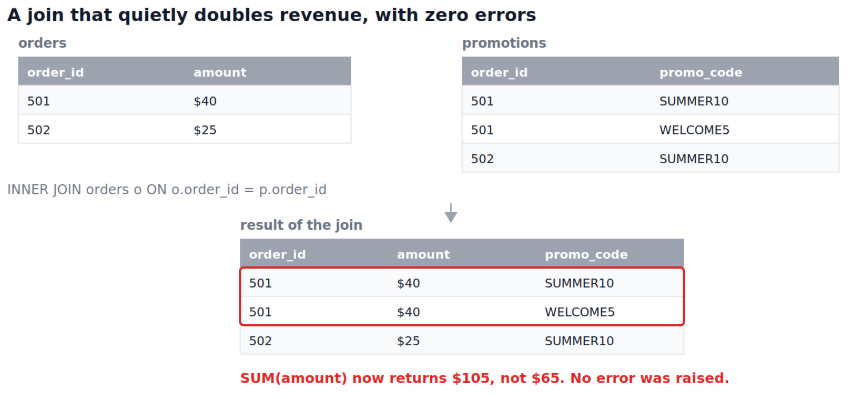
How to catch it. Before trusting any SUM or COUNT that follows a join, compare row counts before and after. SELECT COUNT(*) FROM rides against SELECT COUNT(*) FROM rides r JOIN promotions p ON ... tells you immediately whether the join changed the grain of the data. If the second number is bigger, something downstream is being double-counted, and the fix is usually to pre-aggregate the promotions side before joining, or to separate "what were the promo codes" from "what was total revenue" into two queries rather than forcing them into one.
Torque records a rating for each ride, but riders aren't required to leave one, so a meaningful share of rows have rating = NULL. The ops team wants average rating by driver:
sql
SELECT driver_id, AVG(rating)
FROM rides
GROUP BY driver_id;
This runs cleanly and returns a number for every driver. What it doesn't tell you is the denominator. Standard SQL aggregates ignore null inputs by default, and PostgreSQL's own documentation states this explicitly: unless otherwise noted, built-in aggregates disregard rows where the relevant input is null, and AVG computes the mean of only the non-null values it sees. A driver with 40 rides and only 4 ratings gets an average computed over 4, not 40, and the query gives no indication that 90 percent of the trips contributed nothing to that number.
The same documentation notes a related trap: SUM over zero rows returns null, not zero, which breaks any downstream arithmetic that assumes a numeric result and instead silently propagates a null through the rest of the calculation.
How to catch it. Always pair an aggregate with a count of what went into it. AVG(rating) should sit next to COUNT(rating) and COUNT(*) in the same query, so the denominator is visible rather than assumed. If the two counts differ meaningfully, that gap is itself a finding worth reporting, not a detail to bury.
"Grain" is what one row of a table represents. A query can be perfectly correct against one grain and wrong the moment the underlying table's grain changes without the query changing to match.
Torque's rides table used to be one row per completed ride. After a schema update, it became one row per ride leg, because rides with a stop along the way now generate two rows sharing the same ride_id. A query written against the old grain, SELECT COUNT(*) FROM rides, still runs, still returns a number, and that number is now overcounting completed rides by however many had a stop.
Nothing in the query changed. Nothing in the syntax is wrong. The meaning of a row changed underneath it, and SQL has no way to know that "count of rows" no longer means "count of rides."
How to catch it. Periodically re-verify what one row actually represents, especially after any known schema or pipeline change, by checking whether a supposed key is still unique: SELECT ride_id, COUNT(*) FROM rides GROUP BY ride_id HAVING COUNT(*) > 1. If that returns anything for a column you assumed was one-row-per-value, the grain has shifted and every historical query built on the old assumption needs review.
Torque wants average fare across all twelve cities. Someone computes the average fare per city, then averages those twelve numbers:
sql
SELECT AVG(city_avg_fare) FROM (
  SELECT city, AVG(fare_amount) AS city_avg_fare
  FROM rides GROUP BY city
) t;
This runs without error and produces a plausible-looking dollar figure. It is not the average fare across all rides unless every city had exactly the same number of rides, which they don't. A city with 40,000 rides a month and a city with 400 rides a month get equal weight in that second AVG, so the small city's fare level pulls the "overall average" toward itself far more than its actual share of rides justifies.
This is a specific case of a broader problem: aggregating already-aggregated numbers changes what question you're answering, often without changing how the answer looks. The result is a number with the right units, the right number of decimal places, and the wrong meaning.
How to catch it. When you need a true overall average, compute it from the unaggregated rows directly, SELECT AVG(fare_amount) FROM rides, rather than averaging a set of subgroup averages. If you need the per-city breakdown too, compute both separately and be explicit in any write-up about which one is which.
This one isn't a SQL mistake at all. It's a reasoning trap that a correct query walks you straight into.
Torque compares acceptance rates for two driver groups, new drivers versus veteran drivers, and finds new drivers accept a higher share of ride requests overall. The query is entirely correct. But when the same comparison is run separately for peak hours and off-peak hours, veteran drivers have a higher acceptance rate in both. The reversal happens because veteran drivers work disproportionately more peak-hour shifts, which have inherently lower acceptance rates for everyone due to surge-pricing hesitation, and that shift-mix difference is enough to flip the aggregate comparison.
This is a textbook instance of Simpson's paradox, where a statistical association observed in combined data can reverse when the same data is split into subgroups, a pattern documented across medicine, admissions, and behavioral data for over a century. Neither the aggregate query nor the subgroup queries contain an error. Both are correct arithmetic. Only one of them supports the conclusion "veteran drivers accept less," and picking the wrong one produces a confident, false headline.
How to catch it. Whenever a comparison between two groups will inform a real decision, check whether it holds up inside natural subgroups, especially subgroups where the two populations are unevenly distributed. If new and veteran drivers work meaningfully different shift patterns, that imbalance is exactly the kind of thing that can flip a top-line result, and it's worth checking before the result goes anywhere.
Every failure mode above shares a root cause: a number was trusted because the query that produced it ran successfully. The fix is not more SQL skill, it's a standing habit of interrogating a correct query's result before reporting it. Three questions cover most of what matters: what does one row represent, and has that changed; what got excluded, silently, by a filter, a join, or a null; and would this conclusion survive being split by the most obvious confounding variable. None of these questions can be answered by the database. They have to be asked by the person running the query.
Trusting a total the moment the query runs without error. A successful execution confirms syntax, not meaning.
Joining tables at different grains without pre-aggregating first. If one side of a join can have multiple matching rows, decide deliberately whether that's what you want before the join runs, not after the total looks strange.
Reporting an average without its denominator. A mean computed over a silently reduced set of rows is a different statistic than the one implied by its label.
Averaging averages when a weighted calculation is needed. Subgroup size has to enter the calculation somehow, or small subgroups get equal say with large ones.
Assuming yesterday's grain still holds today. Schema changes, new data sources, and pipeline updates can silently change what a row represents.
Never checking whether a top-line comparison survives being split by an obvious confound. A pattern that only exists in the aggregate and reverses in every subgroup is telling you something real about the data's structure.
Catching join-related duplication and null-driven undercounts gets much faster once JOIN and GROUP BY logic is genuinely second nature rather than something looked up each time, and 15 real-world business SQL problems works through exactly that kind of query against realistic, business-framed scenarios rather than syntax drills.
The reasoning failures, average of averages and Simpson's paradox in particular, sit closer to statistics than to SQL syntax, and statistics for data analysts covers the weighting, variance, and subgroup-comparison concepts that explain why these patterns happen and how to check for them systematically rather than by accident.
Finally, since every failure mode here is really a validation problem wearing an analysis costume, data validation checks every analyst should know covers the row-count, grain, and reconciliation habits that catch most of these before they ever reach a report.
Quiz
Question 1 of 15
FAQ
FREE COURSES

This hands-on Pandas course takes you from your first DataFrame to writing efficient, production-ready data analysis pipelines. Learn data cleaning, transformation, aggregation, merging, time series, reshaping, and performance optimization using one realistic e-commerce dataset. Build five complete portfolio projects covering sales, customer cohorts, inventory, revenue trends, and survey analysis. By the end, you'll confidently handle and analyze real-world data for data analyst and data science roles.
Learn Google BigQuery from the ground up: SQL fundamentals, joins and nested data, window functions, performance and cost optimization, advanced SQL, geospatial analysis, BigQuery ML, and two full portfolio projects with worked solutions.
EDA sits between cleaned data and formal statistical testing, and this course treats it as its own real skill rather than a warm-up step. Five modules cover the EDA mindset, fast univariate and bivariate scanning, multivariate and time-based exploration, anomaly spotting, and turning an exploration session into a prioritized findings summary. Built on a full year of realistic daily business data, including genuine seasonality and two deliberately planted data quality anomalies that a later lesson finds and resolves. Closes with a cold first-look investigation on an unfamiliar dataset and a full performance deep-dive project.