CASE Statements in SQL: Putting Business Logic Inside Your Query
Building a customer-tier segmentation entirely inside a query, on the same orders table from earlier in this series
5 Minutes Read
Data Analytics Program — Data Analytics — Next cohort Starts Oct 24 · 35% Discount
Enroll NowBuilding a customer-tier segmentation entirely inside a query, on the same orders table from earlier in this series
Most of the SQL covered so far in this series describes data as it already exists: which rows match a condition or how those rows are ordered. CASE does something different. It lets you define a new category that doesn't exist in the table at all, built entirely from logic you write, "Gold" if the price clears a threshold, "Bronze" otherwise, and have that new column show up directly in your result.
This is the same table used throughout this series: the 200-row orders table from a small online retailer, with order_id, customer_name, product, category, quantity, price, order_date, and region. Every example below builds a piece of business logic on top of that same schema, culminating in a customer-tier segmentation that's worth remembering, it comes back later in this series when the topic turns to RFM analysis.
# | CASE pattern | What it helps you do |
|---|---|---|
1 | Basic | Create a category from a condition |
2 | Multiple | Build multi-level classifications |
3 |
| Apply business logic to aggregated results |
4 |
| Count categories conditionally |
5 |
| Standardise inconsistent values |
The first two patterns teach the syntax. The later examples show why analysts use CASE in real work: segmentation, conditional metrics, and lightweight data cleaning.
sql
SELECT
    order_id,
    price,
    CASE
        WHEN price >= 3000 THEN 'High Value'
        ELSE 'Standard'
    END AS order_tier
FROM orders;
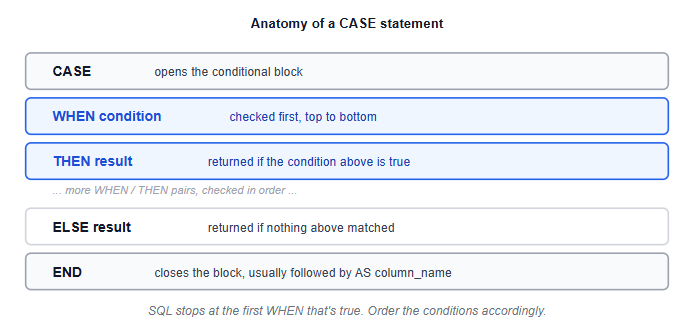
CASE starts a conditional block. Each WHEN condition THEN result pair is checked in order, top to bottom. ELSE catches everything that didn't match any WHEN above it. END closes the block, and AS order_tier names the new column the same way any other expression would be named. The result is a genuinely new column, computed row by row, that exists only in this query's output, not in the underlying table.
sql
SELECT
    order_id,
    price,
    CASE
        WHEN price >= 3000 THEN 'High Value'
        WHEN price >= 1000 THEN 'Mid Value'
        ELSE 'Low Value'
    END AS order_tier
FROM orders;
Order matters here, and it's worth being deliberate about it. SQL checks each WHEN top to bottom and stops at the first one that's true. If you wrote the price >= 1000 condition before price >= 3000, every high-value order would incorrectly land in "Mid Value," since ₹3,500 also satisfies >= 1000 and that branch would be checked first. The general rule: order conditions from most specific to least specific, or from highest threshold to lowest, whichever fits the logic you're building.
This is the version worth remembering, since a variation of this exact pattern comes back later in this series once the topic turns to RFM analysis, segmenting customers by recency, frequency, and monetary value.
sql
SELECT
    customer_name,
    SUM(price * quantity) AS total_spent,
    CASE
        WHEN SUM(price * quantity) >= 10000 THEN 'Gold'
        WHEN SUM(price * quantity) >= 4000 THEN 'Silver'
        ELSE 'Bronze'
    END AS customer_tier
FROM orders
GROUP BY customer_name
ORDER BY total_spent DESC;
This combines CASE with GROUP BY for the first time in this series: the tier is based on each customer's total spend across all orders. SUM(price * quantity) calculates that aggregate, and the CASE expression uses the resulting value to assign a tier. This is a genuinely common real-world pattern: business logic often gets applied to an aggregated number, such as a customer's lifetime value or a region's total revenue, rather than to one row in isolation.
sql
SELECT
    region,
    COUNT(CASE WHEN category = 'Electronics' THEN 1 END) AS electronics_orders,
    COUNT(CASE WHEN category = 'Fitness' THEN 1 END) AS fitness_orders,
    COUNT(CASE WHEN category = 'Home' THEN 1 END) AS home_orders
FROM orders
GROUP BY region;
This is a slightly different use of the same idea, and it's worth learning early because it comes up constantly: turning category values into their own columns, one row per region, with a separate count for each category, instead of one row per region-category combination. Notice there's no ELSE in these CASE expressions. COUNT only counts non-NULL values, so leaving the non-matching case as an implicit NULL is intentional here, not an oversight, it's what makes the count work correctly. You may also see the equivalent pattern SUM(CASE WHEN ... THEN 1 ELSE 0 END), which explicitly adds 1 for matching rows and 0 for non-matching rows.
sql
SELECT
    order_id,
    region,
    CASE
        WHEN region IN ('North', 'north', 'NORTH') THEN 'North'
        WHEN region IN ('South', 'south', 'SOUTH') THEN 'South'
        ELSE region
    END AS region_cleaned
FROM orders;
CASE is also a reasonable tool for standardising inconsistent categorical data directly inside a query, collapsing several known spellings or cases of the same value into one clean version. This handles the specific variants listed in the query; it does not automatically normalise every possible spelling, whitespace, or formatting variation. For a handful of known inconsistencies like this, it works well. For a genuinely large number of messy variants, a separate cleaning step or a lookup table usually scales better than a long chain of WHEN clauses.
Forgetting the ELSE clause when you actually need one. Without ELSE, any row that doesn't match a WHEN condition returns NULL for that column, which is sometimes intentional (as in the conditional counting example above) and sometimes a silent bug that quietly drops rows out of a category you meant to cover.
Writing conditions in the wrong order. Since SQL stops at the first matching WHEN, a broader condition placed before a narrower one will swallow rows that should have matched the narrower one instead.
Comparing to NULL with = inside a WHEN condition. WHEN column = NULL never evaluates to true in standard SQL, regardless of the actual value; WHEN column IS NULL is the correct form.
Using CASE for something a JOIN would handle better. A CASE with fifteen WHEN branches mapping codes to labels is usually a sign that data belongs in its own lookup table, joined in, rather than hardcoded into every query that needs it.
Applying CASE to a raw column when the logic actually belongs on an aggregate. The customer-tier example above is deliberately built on SUM(price * quantity), not on a single row's price; tier logic based on one order rather than a customer's total often produces a misleading segmentation.
CASE is the last of the SQL fundamentals covered in this opening stretch of the series; if any of the WHERE, ORDER BY, or LIMIT foundations it builds on felt shaky, Your First 10 SQL Queries covers that ground on the same orders table used here. For the fuller picture of where SQL fits into the rest of the analyst toolkit, the SQL for Data Analysts guide is the natural next stop.
If you'd like to practise the tiering pattern from this guide on a dataset of your own, a few of the beginner project ideas are a good fit for exactly that kind of segmentation work.
Quiz
Question 1 of 15
FAQ
FREE COURSES
An 11-module SQL course for data analysts preparing for interviews, built around one consistent company (Kestrel Outfitters) and one repeated method: the Five Questions What is the grain? What rows do I need? How should I combine them? How should I calculate the answer? How do I validate it? Starts with how to approach an unfamiliar SQL problem, then builds through core retrieval, aggregation, joins, subqueries and CTEs, window functions, NULL and conditional logic, reshaping and combining data, working with time, and data quality and validation finishing with a dedicated module on performance for analysts. Every lesson includes a custom diagram and a set of interview questions tagged by difficulty (Screener, Analyst, Advanced, Case) and type (Conceptual, Query Writing, Debugging, Optimization, Business Case), each with a fully worked solution. PostgreSQL-first, with dialect callouts for MySQL, SQL Server, BigQuery, and Snowflake throughout.
Learn Google BigQuery from the ground up: SQL fundamentals, joins and nested data, window functions, performance and cost optimization, advanced SQL, geospatial analysis, BigQuery ML, and two full portfolio projects with worked solutions.

This course takes you from MySQL fundamentals to job-ready SQL and database skills through 14 structured modules. Learn database design, querying, joins, aggregation, constraints, indexing, CTEs, views, stored procedures, triggers, and transactions with practical examples and exercises. Build four complete portfolio projects covering e-commerce, library management, blogging, and sales analytics. Finish with interview preparation, career guidance, project ideas, and current compensation insights.