How to Solve a Business Problem Using Data: A Step-by-Step Data Analysis Framework
A repeatable six-stage process for turning a vague business question into a decision leadership will act on
5 Minutes Read
Data Analytics Program — Data Analytics — Next cohort Starts Oct 24 · 35% Discount
Enroll NowA repeatable six-stage process for turning a vague business question into a decision leadership will act on
Most failed analyses do not fail at the SQL query or the chart. They fail in the ten minutes before any of that happens, when a stakeholder says something like “figure out why engagement is down” and the analyst goes straight to the dataset instead of the question.
A data analysis framework exists to slow that first step down. It forces you to define what “solved” looks like before you touch a table, so the three hours you spend in a notebook actually answer something someone can act on. This article walks through a six-stage framework you can reuse on almost any business problem: retention drops, conversion dips, pricing questions, or resourcing decisions. A single running example, a subscription product called ChurnCo with a retention problem, carries through every stage so you can see how the framework behaves on a real (if illustrative) case.
Before going stage by stage, here is the shape of the whole process. Each stage produces a specific output that the next stage depends on, which is why skipping one (usually “frame the problem” or “validate the finding”) tends to show up later as rework.
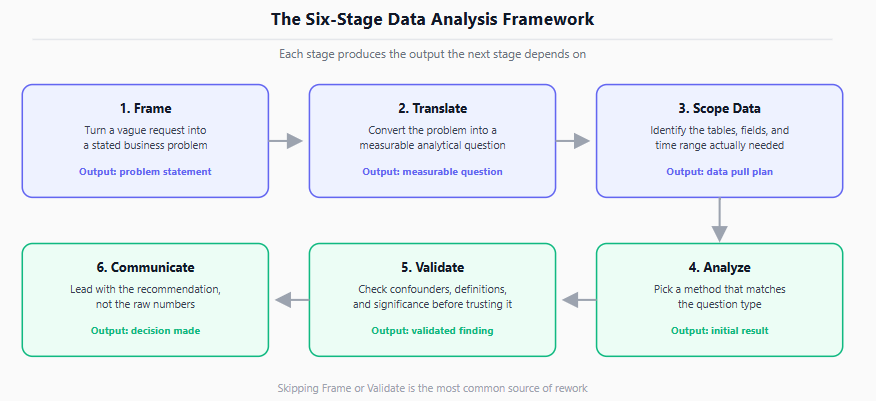
A six-stage flow diagram showing Frame, Translate, Scope Data, Analyze, Validate, and Communicate, each with its required output
The stages are:
Frame the business problem in the stakeholder’s language.
Translate the problem into a measurable analytical question.
Scope the data needed to answer it.
Analyze using a method that matches the question type.
Validate the finding before presenting it as fact.
Communicate a recommendation, not just a result.
Each stage is described below with what to do, a common failure mode, and how it applies to ChurnCo.
ChurnCo’s VP of Growth opens with: “Retention is getting worse, can you look into it?” That is a starting point, not a problem statement. A usable frame answers three things: what outcome is at risk, what decision the finding will inform, and what “good” looks like if the analysis succeeds.
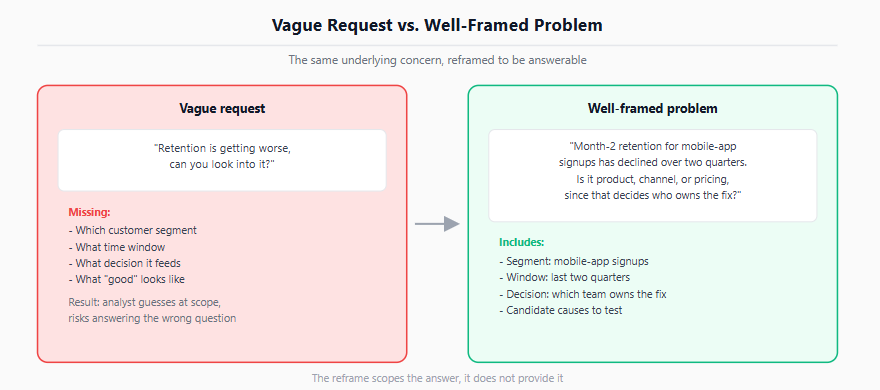
A reframed version: “Month-2 retention for customers who signed up through the mobile app has declined over the last two quarters. We need to know whether this is a product issue, an acquisition-channel issue, or a pricing issue, because it determines whether product, marketing, or finance owns the fix.”
The reframe does not answer the question. It scopes what an answer would even look like, which is the point of this stage.
Vague Request vs. Well-Framed ProblemThe same underlying concern, reframed to be answerableVague request"Retention is getting worse,can you look into it?"Missing:- Which customer segment- What time window- What decision it feeds- What "good" looks likeResult: analyst guesses at scope,risks answering the wrong questionWell-framed problem"Month-2 retention for mobile-appsignups has declined over two quarters.Is it product, channel, or pricing,since that decides who owns the fix?"Includes:- Segment: mobile-app signups- Window: last two quarters- Decision: which team owns the fix- Candidate causes to testThe reframe scopes the answer, it does not provide it
A side-by-side comparison of a vague request versus a well-framed problem statement, annotated with what each is missing
Skipping this stage is the single most common reason analyses stall or get rejected by stakeholders, not because the numbers are wrong but because they answer a question nobody asked. A structured problem-solving approach generally starts by pinning down the root cause through collecting, preparing, and exploring data, before proposing objectives and a solution, rather than starting with a solution and working backward to justify it. The related Gradient Learnings piece on why analytics projects fail covers this same failure mode in more depth, including cases where the analysis was technically correct but organizationally useless.
A framed problem still is not analyzable. “Is this a product issue?” needs to become a question with a metric, a comparison group, and a time window attached.
For ChurnCo, that might look like:
Loose framing | Measurable question |
|---|---|
“Retention is getting worse” | “What is month-2 retention for mobile-app signups, cohorted by signup month, over the last six cohorts?” |
“Is it a product issue?” | “Does month-2 churn correlate with feature adoption in week 1, controlling for acquisition channel?” |
“Is it a pricing issue?” | “Did month-2 churn change after the pricing tier change, compared to cohorts before the change?” |
Writing the question this specifically does two things: it tells you exactly what data you need in Stage 3, and it exposes ambiguity early. If two people on the team would define “month-2 retention” differently (calendar month versus 30-day window, for instance), that disagreement needs to surface now, not after you have already built a dashboard on one definition.
With a measurable question in hand, list the tables, fields, and time range you actually need. For the ChurnCo cohort question, that is typically a signups table, a subscription events table (activations, cancellations, plan changes), and a product usage events table, joined on user ID and filtered to the relevant cohort window.
This is also where you decide your tooling. A cohort retention query is a natural fit for SQL window functions if the data lives in a warehouse: LAG() or LEAD() over an ordered partition can compute period-over-period retention directly in the query rather than in a spreadsheet. The PostgreSQL window functions documentation covers the syntax for this pattern, and the Gradient Learnings guide to SQL for data analysts walks through writing cohort-style queries from scratch.
-- Example: month-2 retention flag per user cohort (PostgreSQL syntax)
SELECT
    date_trunc('month', signup_date) AS cohort_month,
    user_id,
    MAX(CASE WHEN active_month = date_trunc('month', signup_date) + INTERVAL '1 month'
             THEN 1 ELSE 0 END) AS retained_month_2
FROM user_activity
GROUP BY 1, 2;
The INTERVAL '1 month' syntax above is specific to PostgreSQL; MySQL and other engines use different interval syntax, so treat this as a pattern to adapt rather than a portable snippet. If the underlying question also touches drop-off between specific product steps rather than calendar retention, that is a different analytical shape entirely: the Gradient Learnings article on funnel analysis is the better starting point for step-based drop-off rather than time-based retention.
Scoping badly here is expensive later. Pulling too little data means a second round-trip to the source system; pulling too much means hours spent cleaning fields nobody ends up using.
This is the stage most training jumps to first, but the method should follow from the question type in Stage 2, not from whichever technique is most familiar.
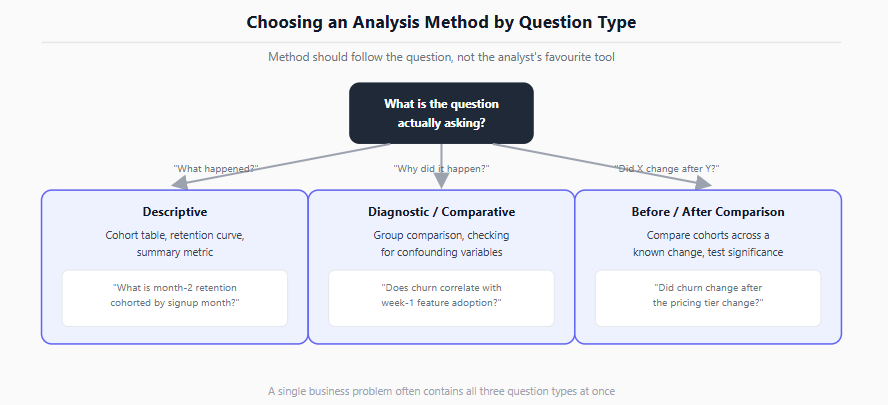
A decision flowchart routing an analytical question to descriptive, diagnostic, or comparative methods based on what it is asking
For ChurnCo’s three sub-questions:
“What is month-2 retention, cohorted by signup month?” is descriptive. A cohort table or retention curve answers it directly, no modeling required.
“Does churn correlate with week-1 feature adoption?” is diagnostic and comparative. This calls for grouping churned versus retained users and comparing adoption rates between them, ideally with a check for confounding variables like acquisition channel.
“Did churn change after the pricing change?” is a before/after comparison. This is where a lot of analysts reach for a simple average comparison and stop, which is the gap Stage 5 exists to close.
If the analysis lives in Python, groupby combined with a pivot is usually enough to build the cohort table without hand-rolling loops; the pandas groupby user guide covers the aggregation patterns used here. For teams still deciding whether a given step belongs in a spreadsheet or a script, this is generally the point where the volume of joins and repeated transformations makes a script easier to maintain than a workbook.
A number that supports the hypothesis you walked in with is not automatically a validated finding. Before presenting a result, it needs to survive a short set of checks.
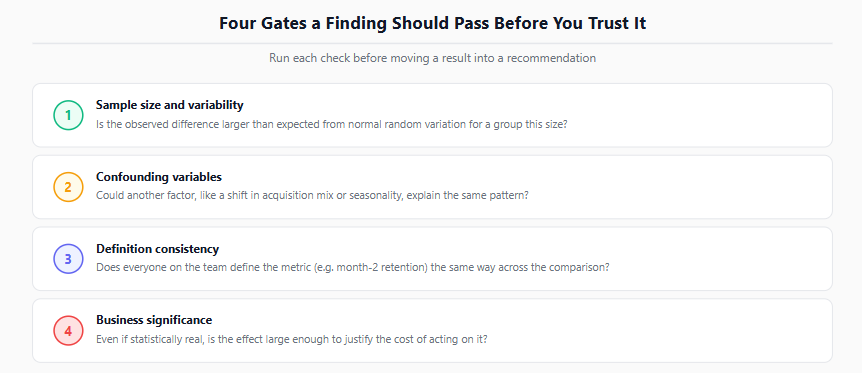
Four Gates a Finding Should Pass Before You Trust ItRun each check before moving a result into a recommendation1Sample size and variabilityIs the observed difference larger than expected from normal random variation for a group this size?2Confounding variablesCould another factor, like a shift in acquisition mix or seasonality, explain the same pattern?3Definition consistencyDoes everyone on the team define the metric (e.g. month-2 retention) the same way across the comparison?4Business significanceEven if statistically real, is the effect large enough to justify the cost of acting on it?
A four-gate validation checklist covering sample size, confounders, definition consistency, and directionality, each marked pass or fail
For the ChurnCo pricing question specifically: a drop in month-2 retention after a pricing change could be caused by the pricing change, or it could be caused by a shift in acquisition mix that happened around the same time, or by a seasonal pattern that shows up every year regardless of pricing. Comparing before/after averages without accounting for these confounders risks attributing the change to the wrong cause.
Basic hypothesis testing (a chi-square test comparing retention rates between two cohorts, for example) can tell you whether an observed difference is larger than you would expect from random variation alone, which is a different question from whether it is meaningful in size. The NIST/SEMATECH e-Handbook of Statistical Methods is a useful reference for choosing an appropriate test once you know what you are comparing. Statistical significance and business significance are not the same test, and a finding needs to clear both before it goes into a recommendation.
A validated finding still needs to survive contact with a decision-maker who has five minutes and did not sit through the analysis. The difference between a data dump and a recommendation is usually structure, not content.
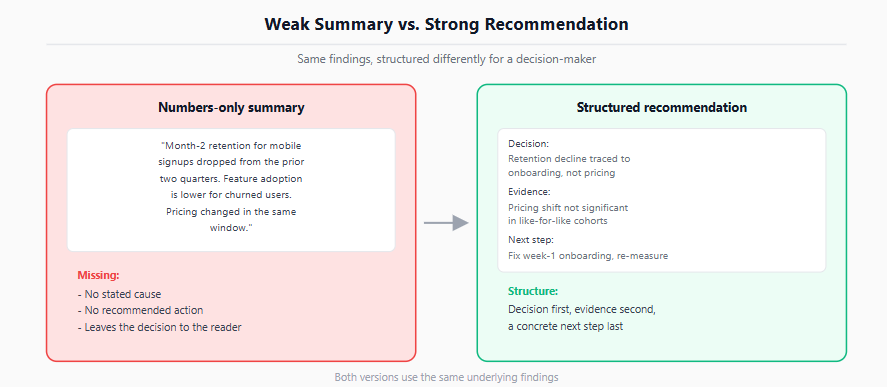
Weak Summary vs. Strong RecommendationSame findings, structured differently for a decision-makerNumbers-only summary"Month-2 retention for mobilesignups dropped from the priortwo quarters. Feature adoptionis lower for churned users.Pricing changed in the samewindow."Missing:- No stated cause- No recommended action- Leaves the decision to the readerStructured recommendationDecision:Retention decline traced toonboarding, not pricingEvidence:Pricing shift not significantin like-for-like cohortsNext step:Fix week-1 onboarding, re-measureStructure:Decision first, evidence second,a concrete next step lastBoth versions use the same underlying findings
A before/after comparison of a weak, numbers-only summary versus a recommendation structured around decision, evidence, and next step
A weak version: “Month-2 retention for mobile signups dropped from the prior two quarters. Feature adoption in week 1 is lower for churned users. Pricing changed in the same window.”
A stronger version leads with the decision: “Mobile-app month-2 retention has declined, and the strongest signal points to low week-1 feature adoption rather than the pricing change, which did not show a statistically significant shift in a like-for-like cohort comparison. Recommendation: prioritize a week-1 onboarding fix over a pricing rollback, and re-measure in the next two cohorts.” Framing insights this way, linked explicitly to a metric and a proposed course of action, is what separates an analysis from a decision.
When the finding itself is unwelcome (retention is down and there is no quick fix), how you frame it matters as much as the finding. The Gradient Learnings guide on presenting bad news to senior leaders covers that specific case in more detail. More broadly, clear problem framing paired with effective visualization is generally what allows a finding to turn into action rather than stalling out as an interesting observation that nobody follows up on.
Starting with the dataset instead of the question. If you cannot state what decision the analysis informs, you are not ready to query anything yet.
Treating a loose framing as if it were already measurable. “Is engagement down” is not a query; “what is the week-over-week change in weekly active users for cohort X” is.
Skipping confounders because the first explanation feels right. The explanation that arrives first is not automatically the correct one.
Reporting a p-value instead of a decision. Statistical significance is an input to the recommendation, not the recommendation itself.
Leading with methodology instead of the call. Stakeholders need the recommendation first and the supporting detail second, not the reverse.
Assuming one pass through the six stages is final. Real problems often send you back a stage, for example discovering in Stage 4 that the data scoped in Stage 3 does not actually support the comparison you need.
This framework assumes you already have workable data access and basic query or scripting skills. If the next step is presenting this kind of finding in an interview setting rather than to a live stakeholder, how to explain a data analyst project in an interview covers how to narrate the same six stages concisely under interview conditions.
Quiz
Question 1 of 15
FAQ
FREE COURSES
A hands-on course that takes you from BI foundations to KPI design, SQL calculation, dashboards, data quality, experiments, and clear communication of insights. Every lesson uses worked examples, exercises, and interview questions. The description is two sentences. If you want it shorter, use: "Learn to design, calculate, analyze, and present KPIs, from BI foundations to dashboards, data quality, and experiments."
EDA sits between cleaned data and formal statistical testing, and this course treats it as its own real skill rather than a warm-up step. Five modules cover the EDA mindset, fast univariate and bivariate scanning, multivariate and time-based exploration, anomaly spotting, and turning an exploration session into a prioritized findings summary. Built on a full year of realistic daily business data, including genuine seasonality and two deliberately planted data quality anomalies that a later lesson finds and resolves. Closes with a cold first-look investigation on an unfamiliar dataset and a full performance deep-dive project.

This hands-on Pandas course takes you from your first DataFrame to writing efficient, production-ready data analysis pipelines. Learn data cleaning, transformation, aggregation, merging, time series, reshaping, and performance optimization using one realistic e-commerce dataset. Build five complete portfolio projects covering sales, customer cohorts, inventory, revenue trends, and survey analysis. By the end, you'll confidently handle and analyze real-world data for data analyst and data science roles.