SQL Deduplication: How to Find and Fix Duplicate Records
Why DELETE FROM ... WHERE duplicate rarely works, and what to run instead
5 Minutes Read

Data Analytics Program — Data Analytics — Next cohort Starts Oct 24 · 35% Discount
Enroll NowWhy DELETE FROM ... WHERE duplicate rarely works, and what to run instead
A support ticket lands at Ticklane, an event ticketing platform: a customer says they were charged twice for the same concert. A quick look at the orders table confirms it, two rows, same customer, same event, minutes apart. The instinct is to write DELETE FROM orders WHERE customer_email = 'jane@co.com' and move on. That query would also delete every other order Jane has ever placed, for every other event, forever. The actual duplicate needed a much more specific definition than "matches this customer" before it was safe to touch.
This article covers how to find and fix duplicate records in SQL properly, using Ticklane's orders table, order_id, customer_email, customer_name, event_id, order_date, ticket_count, and price, as the running example throughout. The core difficulty isn't the SQL syntax, which is fairly mechanical once you know it. It's correctly defining what actually counts as a duplicate before writing a single query, since that definition determines whether the fix is safe or a second, self-inflicted data loss incident.
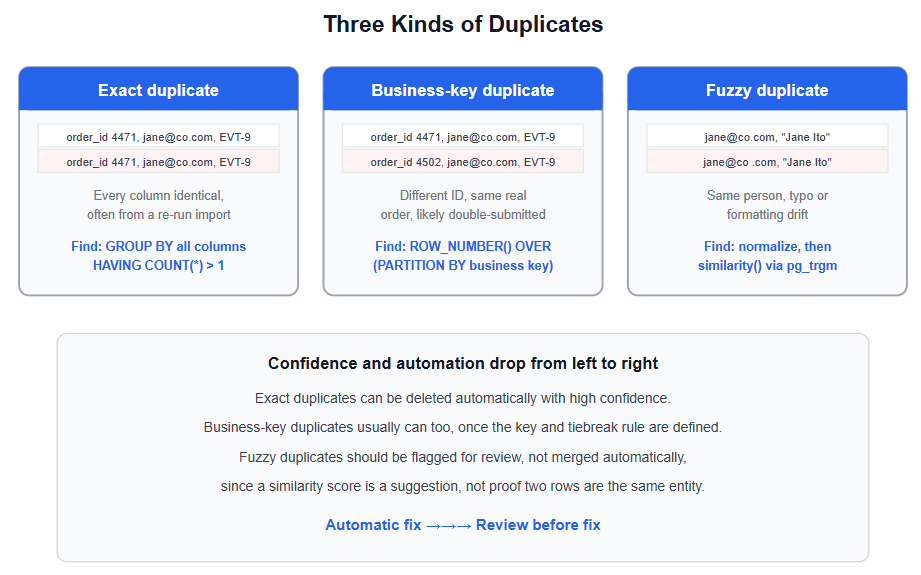
Not every pair of similar-looking rows represents the same mistake, and treating them all the same way is the most common way a deduplication effort goes wrong. Three categories are worth distinguishing before writing any SQL.
Exact duplicates are rows where every column matches, typically the result of a script re-run, a retried API call, or an import file processed twice. These are the safest to fix, since there's no ambiguity about which row is the "real" one, they're identical.
Business-key duplicates are rows that differ in some column, usually the primary key or a timestamp, but represent the same real-world event according to the columns that actually matter for the business. Two orders with the same customer_email, event_id, and ticket_count, placed 90 seconds apart, are almost certainly the same purchase submitted twice by an impatient customer clicking the button again, not two separate orders that happen to look alike.
Fuzzy duplicates don't match exactly on any reasonable key, but represent the same underlying entity once you account for typos, formatting differences, or inconsistent data entry. jane@co.com and jane@co .com are almost certainly the same customer. Confirming that with certainty is harder than the first two categories, and it's the category where being too aggressive causes real damage.
This is the most direct case: group by every column and look for groups with more than one row.
sql
SELECT order_id, customer_email, event_id, order_date, ticket_count, price, COUNT(*)
FROM orders
GROUP BY order_id, customer_email, event_id, order_date, ticket_count, price
HAVING COUNT(*) > 1;
If order_id is a genuine primary key, this query will never return anything, since a primary key constraint guarantees uniqueness on that column by definition. Exact full-row duplicates usually show up in a raw staging table before a primary key has been assigned, right after a file import, which is exactly where this check is worth running before the data moves any further downstream.
This is where most real deduplication work actually happens, and it requires deciding on a business key first: the combination of columns that should uniquely identify one real order, independent of the auto-generated order_id.
sql
SELECT
  order_id,
  customer_email,
  event_id,
  order_date,
  ROW_NUMBER() OVER (
    PARTITION BY customer_email, event_id, ticket_count
    ORDER BY order_date ASC
  ) AS row_num
FROM orders
WHERE order_date > NOW() - INTERVAL '1 year';
ROW_NUMBER() assigns a sequential number within each group of rows that share the same customer_email, event_id, and ticket_count, ordered here by order_date so the earliest order in each group gets row_num = 1. PostgreSQL's documentation describes window functions like this one as performing a calculation across a set of rows related to the current row without collapsing them into a single output row, which is exactly what makes this approach useful here: every row stays visible, but each one is now labeled with its position inside its duplicate group, ready to filter on in a later step.
Choosing the business key is the actual judgment call in this whole process, more than the SQL itself. Partitioning only by customer_email and event_id would flag a customer who legitimately bought two separate ticket batches for the same event as a duplicate. Adding ticket_count and a tight time window narrows the definition to something much closer to "the same submission, twice."
Fuzzy duplicates need a different approach, since they won't match on an exact key no matter how the key is defined. The first step is normalizing the data enough to catch the easy cases: trimming whitespace and standardizing case before comparing.
sql
SELECT customer_email, customer_name, COUNT(*)
FROM orders
GROUP BY LOWER(TRIM(customer_email)), LOWER(TRIM(customer_name))
HAVING COUNT(*) > 1;
This catches Jane@Co.com and jane@co.com as the same value, but it won't catch a genuine typo like jane@co .com with a stray space in the middle, or Jane Ito versus Jane Ito with doubled internal spacing. For that level of fuzziness, PostgreSQL's pg_trgm extension compares strings based on shared three-character sequences, and its documentation describes the approach as measuring the similarity of two strings by counting the number of trigrams they share, which turns out to be effective for catching exactly this kind of near-match.
sql
SELECT a.customer_email, b.customer_email, similarity(a.customer_email, b.customer_email)
FROM orders a
JOIN orders b ON a.order_id < b.order_id
WHERE similarity(a.customer_email, b.customer_email) > 0.6
ORDER BY similarity(a.customer_email, b.customer_email) DESC;
Treat the output of a query like this as a candidate list for review, not a list of confirmed duplicates. A similarity score is a strong hint, not proof, and merging two genuinely different customers because their emails happened to look alike is a worse outcome than leaving a real fuzzy duplicate unmerged for another day.
Deciding which row to keep is a second judgment call, separate from finding the duplicates in the first place. Common tiebreak rules include keeping the earliest row, since it likely reflects the original, genuine action, or the most recently updated row, if later edits are more likely to be correct. Once a rule is chosen, ROW_NUMBER() makes deleting everything except the kept row straightforward.
sql
WITH ranked_orders AS (
  SELECT
    order_id,
    ROW_NUMBER() OVER (
      PARTITION BY customer_email, event_id, ticket_count
      ORDER BY order_date ASC
    ) AS row_num
  FROM orders
)
DELETE FROM orders
WHERE order_id IN (
  SELECT order_id FROM ranked_orders WHERE row_num > 1
);
This deletes every row in each duplicate group except the earliest one, row_num = 1, per group. Run the SELECT version of the CTE first and review the rows it flags before ever running the DELETE, since a mistake in the PARTITION BY columns here deletes real data with no undo. Sometimes the better fix isn't deleting the later row outright but merging useful information from it into the row you're keeping, for example if the duplicate order happened to have a corrected shipping address, using COALESCE to prefer whichever row has a non-null value for a given column before the delete runs.
Finding and fixing existing duplicates is only half the job. Without a constraint that prevents the same duplicate pattern from recurring, this cleanup becomes a recurring monthly chore instead of a one-time fix.
sql
ALTER TABLE orders
ADD CONSTRAINT unique_order_submission
UNIQUE (customer_email, event_id, ticket_count, order_date);
Adding a unique constraint on the business key, once it's been decided, makes the database itself reject a future duplicate at insert time rather than relying on a periodic cleanup query to catch it after the fact. For an application that legitimately wants to retry a submission safely, without erroring out on the retry, PostgreSQL's INSERT ... ON CONFLICT clause handles this directly: the documentation describes it as specifying an alternative action to raising a unique constraint violation error, which can be set to silently do nothing on a conflicting insert rather than creating a second row or crashing the request.
sql
INSERT INTO orders (customer_email, event_id, ticket_count, order_date, price)
VALUES ('jane@co.com', 'EVT-9', 2, NOW(), 140.00)
ON CONFLICT (customer_email, event_id, ticket_count, order_date) DO NOTHING;
This is the difference between deduplication as a one-time cleanup project and deduplication as something the schema itself enforces going forward.
Deleting duplicates before defining a business key. Running a broad DELETE based on a single matching column, like an email address alone, risks deleting legitimate, distinct records that happen to share that one value.
Never running the SELECT version of the cleanup query first. A DELETE built on a ROW_NUMBER() CTE should always be tested as a SELECT first to confirm exactly which rows would be removed, since a mistake in the PARTITION BY clause deletes real data permanently.
Treating a fuzzy match as a confirmed duplicate. A high similarity score between two email addresses or names is a candidate worth reviewing, not proof the two rows represent the same real-world entity.
Fixing existing duplicates without adding a constraint to prevent new ones. Without a unique constraint or an upsert pattern at the point of insert, the same duplicate pattern will keep recurring, turning a one-time cleanup into a recurring chore.
Discarding information from the row being deleted instead of merging it. The row being removed sometimes has a more complete or more recent value in a specific column; merging with COALESCE before deleting preserves that instead of losing it.
Assuming SELECT DISTINCT fixes the underlying problem. DISTINCT changes what a single query returns, but it doesn't remove the duplicate rows from the table, and every other query against that table still sees the duplication.
This process leans on comfort with window functions, CTEs, and constraints, all covered in more depth in the SQL skills guide for data analysts if any of the ROW_NUMBER() or PARTITION BY syntax in this article felt unfamiliar. It's also worth treating deduplication as a recurring health check rather than a one-time fix, running the exact and business-key detection queries from this article periodically even after the immediate cleanup is done, since new duplicate patterns tend to appear whenever an upstream form, import process, or integration changes.
Quiz
Question 1 of 15
FAQ
FREE COURSES
Picks up exactly where a SQL basics course ends and covers subqueries, common table expressions, and window functions in depth, including the specific bugs that silently produce wrong answers in production, like the NOT IN and NULL trap. Built on a real five-table relational database with genuine foreign key relationships, delivered as both SQLite and CSVs. Covers scalar and correlated subqueries, recursive CTEs, ranking and offset window functions, frame clauses, and a practical decision guide for choosing the right tool. Closes with two portfolio projects producing polished, presentation-ready analytical queries.
Most of an analyst's time goes into cleaning, not analyzing, and this course treats that seriously. Five compact modules cover the full workflow: inspecting and typing a new file, handling missing data and duplicates, standardizing text and catching invalid values, merging and reshaping multiple sources, and finally building one reusable, validated cleaning pipeline. Every lesson runs on a realistically messy dataset with genuine data quality problems built in on purpose, so what you're fixing is real, not simulated. Closes with two portfolio projects: a multi-source merge and a full reshape-and-validate pipeline.
An 11-module SQL course for data analysts preparing for interviews, built around one consistent company (Kestrel Outfitters) and one repeated method: the Five Questions What is the grain? What rows do I need? How should I combine them? How should I calculate the answer? How do I validate it? Starts with how to approach an unfamiliar SQL problem, then builds through core retrieval, aggregation, joins, subqueries and CTEs, window functions, NULL and conditional logic, reshaping and combining data, working with time, and data quality and validation finishing with a dedicated module on performance for analysts. Every lesson includes a custom diagram and a set of interview questions tagged by difficulty (Screener, Analyst, Advanced, Case) and type (Conceptual, Query Writing, Debugging, Optimization, Business Case), each with a fully worked solution. PostgreSQL-first, with dialect callouts for MySQL, SQL Server, BigQuery, and Snowflake throughout.